
New models include advanced features such as High Definition Recording, DNLA Home Networking as well as Viera Cast and Viera Link integration
Panasonic have announced its new flagship DVD Recorders– the DMR-XW480 and DMR-XW380. These models offer High Definition recording, DLNA Home Networking, twin HD tuners and a host of advanced new features. The new models demonstrate Panasonic’s ongoing commitment to innovation and quality in the High Definition age, incorporating leading-edge capabilities such as twin HD tuners which enable customers to record two digital broadcasts at the same time.
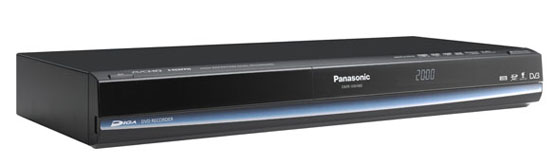
“Panasonic’s DVD Recorders lead the industry, receiving the GfK No 1 Award based on the highest number of unit sales for the 2009 calendar year. Panasonic also recorded the highest value sales over the same time period. We expect this new range to be an even more compelling offering for Australian families”
Sophie Barton, Group Marketing Manager AV, Panasonic Australia
The key features of the new models are as follows:
Convenient Networking and Connectivity
For networking opportunities, both Recorders come with DLNA Server functionality. Using your LAN connection, recorded programs, AVCHD and JPEG files archived on the hard disc drive can be viewed and enjoyed in a separate room via a compatible DLNA client device.
DLNA Technology
Using DLNA technology, Panasonic Blu-ray Disc Players and Blu-ray Home Theatre Systems can access content archived on DLNA Server Blu-ray Disc Recorders, DVD Recorders with HD Recording, or compliant devices. By simply connecting to your Home Network (LAN), you can enjoy accessing recorded programs, AVCHD video, and JPEG files. For example, in a typical family scenario, the kids could be in the lounge watching the VIERA TV and viewing content from their Blu-Ray Disc Recorder’s HDD such as a movie or TV program.
VIERA Cast
VIERA Cast provides consumers with user-friendly internet enabled technology to access YouTube, Web-based photos on Picasa, stock information on Bloomberg and weather forecasts. This innovative function can be easily accessed using a single button on the Recorder’s remote control for viewing on any home TV.
VIERA Link
By connecting a DVD Recorder to a VIERA Link-compatible Panasonic VIERA TV via an HDMI cable, the user can control Panasonic AV components. Using the Seamless Graphical User Interface, when the TV is on, simply press the VIERA Link button on the remote and select ‘Recorder’ on the VIERA Link menu screen. The Recorder’s menu will display on the TV screen, and you can operate the Blu-ray using one remote.
Model Release Dates and Pricing
DMR-XW480 – April $999
DMR-XW380 – April $799
Hi there , just bought this recorder (380), very happy with it , but manual not very ‘friendly’.
I’m having a little problem with recording from then IQ box :
Can’t find a way to set the timer to record a program. It looks like it can be set only for digital channels but not for recording from other equipment. I hope I’m wrong because I bought this recorder thinking that could do the same job of my old Pioneer.
Any help appreciated.
Thanks.
Alex
Hi Alex,
Yes you can record from your IQ box. When setting the timer recording, highlight the channels area and at the bottom of the screen you will see you are prompted to press the RED button to select and AV input, press the RED button until AV1 appears, now your timer recording will record the AV1 input at the time specified. You can check page 30 of the user manual, Item 3 takes you through what you can change on the timer record screen.
Thankyou,
Team Panasonic
I have not had success with tuning all channels to my panasonic DVD DMR-RW780 recorder. I live in Canberra. I receive all channels on my Samsung Series 6 HD TV but only the two channel ten stations (no.55) and ‘One’ through the recorder.
I have connected the HDMI cable and the outdoor aerial to the recorder and then the coaxial cable from recorder to TV. I have also tried using additional connections – red/yellow/white but without results.
I am keen to record programs and would appreciate any advice that could assist me with making my TV and recorder ‘talk’ to each other.
Thanks
Taylor
Thanks for that,
another couple of questions :
is it possible to record direct to DVD ? For what I have seen it doesn’t look possible.
I’m a bit confuse how to do high speed copy do DVD. I’ve tried a few times but I can’t manage to copy in a few minutes as with my previous recorder.
Alex
Can someone please direct me to a forum where this recorder is discussed ?
I’m having nightmares.
Thanks
Bought the 380 about two weeks ago and when it is working it is great.
Problem is that the channels in memory just disappear and require reprogramming on a regular basis. eg was just watching Ch 10, (without touching remote), channel 10 disappeared and left me watching 7. Now going through the guide and at least 10 has disappeared. Last week when I turned it on, ch 2 had disappeared and the stations had to be reprogrammed.
I bought this and the Panasonic LCD HD 37inch as I was told they were quality units and would work seamlessly.
Any suggestions before I make a warranty claim?
i have the 380 recorder and was hoping to use the dlna networking to back up stuff to my computer and to watch downloaded video on my tv
i thought i would be able to access the hard drive in the recorder directly
im using xp
i have tried wmp and ps3 media server with the recorder plugged directly into the computer
(tried straight and crossover cables)
is windows 7 going to help as im about to buy a new computer?
thanks
dazza
DMR-XW480 – can I record two different channels (rec 1 & rec2)at the same time via the tv guide? I have tried but it pauses the second one. why?
I just bought a DMR-XW480 by mail order and it was not getting any digital signal at all after the 1st day. Tried to contact Panasonic & they sent me back to my retailer – so I have now posted it back – just waiting to see what happens next – very unhappy.
With the dvd recorder can you record only from IQ box as we have only got basic foxtel. We have just purchase a TH-P42V20A plasma tv and are looking at purchasing a dvd recorder as our other one burn’t out.
Hi Graeme,
Yes you can record two shows simultaneously, however one show must be recorded in DR mode for this to work.
Many Thanks,
Team Panasonic
Hi Dazza,
the DMR-XW380 is a DLNA server device, this means the recorder can only stream recorded footage to a DLNA client device. This function however doesn’t allow storage of recorded shows onto a PC. In order for the DLNA function to work it is best to use a router connecting both the PC and the recorder. If you are using Windows XP you will need to purchase 3rd party DLNA software to perform the communication with the recorder. If you are using Windows 7 this is done with WMP12 simply by turning on “media Sharing” and turning the “DLNA Server function” to “on” in the set up menu of the recorder. This will allow you to watch the recorded content of the recorder on your PC.
Many Thanks,
Team Panasonic
Hi June
This is very unusual, I would suggest you have the recorder checked by an authorised service centre.
For details please visit http://www.panasonic.com.au/support/service_centres/
Many Thanks,
Team Panasonic
Hi Monica,
If your unit is under 21days old you can return it to the store for a changeover. If it is outside 21days old please visit one of our authorised service centres to have the unit inspected. For details please visit http://www.panasonic.com.au/support/service_centres/
Many Thanks,
Team Panasonic
I have a similar problem to Monica Stephens of June 26, 2010 at 1:28 pm and Prue of August 12, 2010 at 4:07 pm
I just bought a 380 and could not auto tune any channels (only the 9 network channels in really poor quality). I took it back to the store and they plugged it in and it worked perfectly. They did have a different rf setup to me. I brought it home again and it failed to work except when I held the co ax rf near the receiver or just touching, then it worked perfectly, however when I plugged it fully in I got the same problem. No signal. I returned the unit today and got a replacement and it has the exact same problem. It only works when I hold the rf co ax near or just touching the receiver at the back of the unit. Obviously this is not an ideal setup.
I have two panasonic plasmas which work perfectly using the same coax connection.
yes but you can only record what you are watching on foxtel, to record and watch an other channel, you will still need IQ
just purchased xw=380 and cant work out how to or if you can record direct to a dvd . i was told by the sales rep that i could.can you help? i want to record direct to the dvd without first recording to the hard drive .thanks
Very happy with my new DMR-XW380 but it will not record on any Channel 9 program, it works on all other digital channels in Perth? Please help?
Hi Bruce,
Currently CH9/WIN in Perth is experiencing EPG problems associated with a hardware issue at their end, however Panasonic has written firmware to rectify this broadcaster related issue and this is now available for download. Currently Panasonic is performing on Over the Air Download so you will find your unit will update automatically in the next couple of days.
Many Thanks,
Team Panasonic
Hi Stephen,
I am sorry to say but you must record to the HDD first, you cannot record directly to DVD. If this was advised by your retailer then this is incorrect.
Many Thanks,
Team Panasonic
Hi Gerard,
From your description it does sound like you may have a very strong signal. This can actually have a negative effect on some products as the sensitivity of all tuners are not the same. To confirm if this is your problem you may need to attenuate your signal, this can be done using an attenuator adaptor, around 5db or 6db should drop the signal enough to allow correct operation.
Many Thanks,
Team Panasonic
Hi,
I’m looking at purchasing the XW480 but I have a technical question. Can the XW480 use the DLNA to stream video recorded on the HDD to a DLNA compliant device like a PlayStation 3? I have two large flat panel tv’s, and I want to be able to record on the XW480 and playback on either TV without having to physically move the device (or burn a DVD every time) (one will connect via HDMI to the XW480, the other is currently connected to a PS3 that is on a wireless network (which is how I’d like to stream from the XW480 through DLNA to the PS3/other TV). The XW480 Looks like a great product …
Thanks
Michael
Hi, purchased the 380 DVD recorder for my husband for fathers day, everything looks great except that the recorder will not pick up any SBS channels. When it gets to channel 3 it says “invalid channel”.
SBS works fine when we watch it directly from TV.
Ironically SBS is the main channel my husband wanted to record! Please Help!
Hi Michael,
Yes the DMR-XW480 will stream recorded content on the HDD to your PS3.
Many Thanks,
Team Panasonic
Hi Helen
You may have very strong signal. In this case it is possible the tuner is not coping with such a high signal. An attenuator may be required to reduce your signal level. In this case please contact our call centre on 132 600 and they can arrange an attenuator for you.
Many Thanks,
Team Panasonic
Purchased a new dmr-xw380. trying to get my foxtel to run through it but cant wrk out what cables need where and which input to use. would like to record foxtel shows. any help would be great. tks!
Was having the same problem as both Monica and Gerard with a DMR-BW780.
Either only three stations (channel 10) or some station saved on auto searth or very bad signal breakup.
After a lot of internet searching I tried removing the HDMI cable and replaced it with an svideo cable, I now have all stations and a signal quality of 8 or more.
Regards
Guy
I am about to purchase a DMRXW380 and have quite a lot of Region 1 and Region 2 DVDs, will they play all right on this model. I have an old Panasonic DVD player and VHS recorder combo and they play fine on there. I am just worried they may not play properly on the new 380 model.
Thanks
Linda
I bought a 380 a month ago and was happy till for no reason today the remote stopped working. Only the top righthand corner buttons work, which is tv only functionality. For some reason and DVD recorder functionality won’t work, I have to switch power on from unit, however theremote allows me to turn on tv. I changed batteries, no luck and followed the trouble- shooting in my instructions, no luck. Can u assist?
I have a Panasonic LCD TV and a DMR-EX79 DVD recorder. Until a few weeks ago SBS signal was Ok on both TV and DVD recorder. For some reason DVD recorder suddenly would not receive any SBS signal (both TV and radio) but TV receives all channels including SBS. I live in Nunawading Vic. Can you please advise actions to restore SBS signal via DVD recorder. Regards Col
I am contemplating to purchase a 380. I was told I can view the shows thru USB.
Another question, is can I transfer shows from HD to USB.?
Thanks in advance.
how do i enable DLNA on a DMR XW350?
Hi
Is it possible to copy files from a DVD to the hard drive (for storing and viewing) on a XW480 or XW380?
Regards, Joe
Hi Matthew,
You will need a composite AV cable (Yellow/Red/White) cable however it will depend on your FOXTEL box. Most FOXTEL boxes will output via a SCART connector so you will need to purchase a SCART to COMPOSITE AV cable or adaptor. You can then plug this into the FOXTEL box and into the AV1 Input on the rear of the DMR-XW380. To record FOXTEL you then use the [INPUT SELECT] button the recorder remote and select AV1, then select the FOXTEL channel using the FOXTEL remote and press record on the recorder remote. To timer record a FOXTEL channel, press the [PROG/CHECK] button to view the timer record screen, on the channel selection press the red button several times until AV1 input is selected, then select the date and time the FOXTEL programme is running. You will need to use the FOXTEL “planner” section to load the FOXTEL programme into the FOXTEL box.
Many Thanks,
Team Panasonic
Hi Guy,
It is very well documented and known that poorly shielded HDMI cables can create high levels of interference. What you are describing sounds like this. Also if you have very strong signal it could also mean you are getting “over modulation” which can also give poor reception. In this case I would begin by trying a different brand HDMI cable, if this does not fix your problem then contact our customer call centre on 132 600 and they can assist you with any over modulation/strong signal issues you may have.
Many Thanks,
Team Panasonic
Hi Linda,
Yes the DMR-XW380 is enhanced to play these discs.
Many Thanks,
Team Panasonic
Hi Marisa,
It is possible you have changed the remote control code by accident. If you press a button on the remote like power and it shows DVD1, DVD2, or DVD3 then simply press this number on the remote together with the [OK] button on the remote for more than 5 secs, this will code your remote to the same code as displayed on the unit.
Many Thanks,
Team Panasonic
Hi Col,
I would begin by performing an auto tune on your product again, This is done by pressing the [FUNCTION] button, selecting [OTHERS], the [SETUP] and going into the tuning menu. Select [AUTO TUNE], then see if SBS is restored.
Many Thanks,
Team Panasonic
Hi Kim,
We’re not sure what you mean by “shows through USB” however the USB supports DivX, DivX HD, JPEG (photos), MP3 (music), AVCHD (files directly from a HD camera)(Copy to HDD only), and MPEG (files directly from a SD camera)(Copy to HDD only). You cannot transfer recorded TV shows from the HDD to a USB device.
Many Thanks,
Team Panasonic
Hi Tim,
Hi, the DMR-XW350 does not support DLNA.
Many Thanks,
Team Panasonic
Hi Joe,
Almost all commercially available DVD-Video discs are sold with copy protection, this means you cannot copy them to the HDD. If you have a DVD-Video disc that was originally filmed by a camera then put onto disc then it can be placed on the HDD for storage and viewing.
Many Thanks,
Team Panasonic
Hi Panasonicau
I have purchased the DMR-XW380 and it seems to play my region 1 discs (the ones I have tried so far at least) but will not play all my region 2 discs. At this stage of checking my discs it will only play one region 2 disc and the other four that I have tried it says “This disc may not be played in your region”. Any reason why it seems to be so selective with the different discs. I can think of no reason why it will play a disc from region 2 and then not play another one from region 2. It is not a real problem as I have other DVD players that will play these discs that the DMR-ZW380 will not play, it is just that I would prefer to have only the one machine for playing DVDs rather than have another hooked up, much neater with cables, etc.! Thanks for your help.
Linda
Hi Panasonicau
Just an addition to my last comment! The DMR-XW380 will also not play discs that I bought from England but they say they are Region 2 & 4. What could be the problem there as surely they should be playable if they say Region 4 as well as 2. All these discs that I cannot play on the DMR-XW380 I am able to play on my old Panasonic DVD Player/Video Recorder Combo and my Sony DVD player. I am mystified about this. Any feedback you can give me would be appreciated.
Thank you
Linda
Can the Panasonic XW 380 be used with a 10 years old analogue TV to receive digital channels ?
We love our old Panasonic HDD recorder which we have used for the last 5 years with the analogue TV and a set top box. Our digital set top box has stopped working. We have bought the XW 380 but do not seen to be able to get any clear reception on the TV when it is connceted through it. Where we givne the wrong information that it can replace the set top box?
Question Updated (2)
3 weeks ago I purchased a Panasonic DMR-XW380 and then went on a holiday. Ever since I got back I have unsuccessfully being trying to tune it in to receive TV stations.
I can only get it to tune to SBS and channel 31.
It is connected to a LG Digital TV. Whilst connected I can watch all TV stations thru the TV but eventually the TV loses its signal and I have to disconnect the recorder and re program the TV
It plays DVDS with no issues.
It is connected using a Belkin HDMI cable and also has an amplifier on the aerial which was connected prior to the purchase of the player. The coax and the aerial are approx 11 years old.
The TV signal and picture with out the recorder connected is good quality I live in the northern surburbs in Melbourne.
Any help would be appreciated as I am ready to take it back.
I have a Panasonic G9 VHS recorder and a DMR-XW380 DVD recorder. Can I connect the VHS recorder to the DVD recorder and copy my VHS tapes to the DVD recorder?
Thanks in advance
John
Panasonic Team,
We have had our Plasma (TH-P42G10A) for about ten months and received the DVD recorder DMR-XW350 a month or so later. From the start the DVD recordedr seemed to have problems receving SBS. I returned it to a service centre but they could nto find a problem. I relocated the aerial and aligned to point more accurately at the SBS tower. Initially it reported signal strength of 9 and quality 7 (on both units). Since that time both the TV and DVD, the signal disappears, reporting strength 9 and quality varying 0 to 3. Strangely, the DVD recorder recorded SBS ok when the TV was not on. (All other channels are 10 and 10).
For reference we live in Nedlands in Perth and run the signal through an amplifier. Same problem with the analogue signal (TV only of course).
So this weekend i relocated the aerial again (to ensure that a large tree was not in the way). The signal strenght is now 10, but the quality remained as bad. So I disconnected the DVD player from the TV and connected through AV to an old TV set. The DVD reported strength of 10 and quality 8. When I plugged either the HMDI or AV connection to the Plasma (and only when it was turned on), the signal quality dropped to 1-3 again. This was consistent thorugh many repeats, ie. the DVD recorded could tune in ok, when the plasma was either off or disconnected, but could not if it was connected and plasma turned on.
What to do?
cheers
Tim
Dear Panasonicau
I bought a DMR-XW380 (Australia) and discovered it won’t play Region 4 DVD Disks even though the front page of the manual says it would. How can I get this fixed.
All the other functions worked perfectly. Can you give me some advice and help on what to do ?
Thanks
Hi Panasonicau
I have purchased the DMR-XW380 and it seems to play my region 1 discs (the ones I have tried so far at least) but will not play all my region 2 discs. At this stage of checking my discs it will only play one region 2 disc and the other four that I have tried it says “This disc may not be played in your region”. Also it will not play discs I bought from England but which state they are region 2 and 4. All these discs play on my old Panasonic DVD player/VHS recorder. Any reason why it seems to be so selective with the different discs. I can think of no reason why it will play a disc from region 2 and then not play another one from region 2. It has obviously been enhanced to play discs other than region 4 but I am mystified why all the region 2 discs will not play.
Thank you.
Linda
I have a DMR-BW780 for over 2 months now and worked extremely well until yesterday when for some reason it seemed to loose channel 7 on the TV and recorder. I reset the channels on the TV ok and then tried to reset Channel 7 on the recorder but now I cant get any channels at all on the recorder but can still play what already recorded. I\’ve tried to auto-tune but it wont pick up any channels at all. The aerial works well direct into my TV so the problem isnt with the cable. I am completely baffled as I could pick up all TV stations previously without any problems now I cant get any. Your assistance would be very grateful.
I have a DMR-XW 380 and a Panasonic G9 video recorder. How can I transfer the data on my VHS tapes to the DMR-XW 380?
Thanks in advance.
John
Hi John,
You can plug your camera into the AV input on the front or rear of the DMR-XW380, then by pressing [INPUT SELECT] on the DVD recorder remote you can select the input you are connected to. Once this is done, start playback on your camera and press record on the recorder.
Many Thanks,
Team Panasonic
Hi Dennnis,
This does sound very strange. I would advise you to visit one of authorised service centres to have the unit inspected. For details please visit http://www.panasonic.com.au/support/service_centres/
Many Thanks,
Team Panasonic
Hi Chris,
Yes the unit should play region 4 DVD’s, to have this rectified you can either return it to the place of purchase if under 21days old, or visit one of our authorised service centres. For details please visit http://www.panasonic.com.au/support/service_centres/ .
Many Thanks,
Tema Panasonic
Hi John,
Yes the unit should play region 4 DVD’s, to have this rectified you can either return it to the place of purchase if under 21days old, or visit one of our authorised service centres. For details please visit http://www.panasonic.com.au/support/service_centres/ .
Many Thanks,
Team Panasonic
Hi Mick,
It could be possible that you have too much signal causing over modulation. If you are in an area with good quality signal you may not need your amplifier. To begin with I would start by turning off the aerial amplifier and see if conditions improve. If you end up with poor quality signal on your TV due to no amplifier, then it is possible you may need to attenuate the signal coming into the DVD recorder. If this is the case please contact 132 600 and request an attenuator and we will send one out.
Many Thanks,
Team Panasonic
Hi george,
Yes the DMR-XW380 can be used when connected to an analogue TV. From what you have described you are not getting any signal to pass through the DVD recorder to the TV. This is more than likely due to high signal through the DVD recorder causing over modulation and therefore dropping the signal quality to the TV. In this case you may need an attenuator on the DVD recorder. Please contact 132 600 and request an attenuator.
Many Thanks,
Team Panasonic
Hi Team
I purchased a variable attenuator from Jaycar for $12 and it worked a treat.
Thanks heaps.
Hi Tim,
To maintain optimum signal quality from TV aerial, use a TV aerial splitter (as illustrated page 50; TV user manual) when connecting two or more devices that require an RF connection to the same aerial. It is also probable that the HDMI cable may be corrupting DTV signal data packets (signal quality). Suggest you purchase a Panasonic HDMI cable.
Many Thanks,
Team Panasonic
i have a 380, I was told at purchase, I could record two TV channels, and watch a third channel….
I have managed to get the two channels to record at the same time, no problems, unfortunately, when recording, I can only switch between the two recording channels, and not get any other channels to watch…
any suggestions….
thanks
I have a 380….. can you let me know, if it is possible to record two channels at the same time watching a third..
I have managed to have two channels record….but am not able to then switch to a third to watch live……
any suggestions appreciated..
Thanks
On one of the older Panasonic DVD Recorders the playback type must be selected (NTSC or PAL) which interferes with recording when also playing NTSC DVD’s. Is this still the case with the DMR-XW380 ?
Cheers,
Jason
I am in Adelaide and bought a DMRXW480 almost a week ago. It tunes all channels however I cannot set the timer to record any of the channel 9 network stations. It just won’t do it. Other channels will do timer recording.
Also the guide does not bring in all programs – is very slow at first for many channels and channel ninie does not usually show more than the current program when it does come in – at best it will show up to 12 hours of programs rather than a week.
I found instructions to return to shipping default and did the setup again with no improvement.
I had an earlier model panasonic dvd that worked much better than this but changed as it could not record the HD channels.
Also the operating instructions for this later model are really lacking.
Please can you help as I am really dissappointed.
Jen
Panasonic Team
I have a Panasonic Plasma Viera TV Model No TH-50pv60a . Last Month I bought DMR-XW480 DVD Recorder. My tv remote does not have viera link or viera cast buttons. I’ve read that throught Viera cast function of DVD, you tube can be viewed on tv. Should I buy a new remote for my tv to enable the use of this funtion? Does this model support this function? Any advice would be much appreciated.
Thanks.
Regards,
NR
Hi, I have had a Panasonic DMR xw300 for the last year and it worked great with new LG tv. Just bought new larger Samsung TV that the Retravision guy came and installed and set up in my home. Only when he left did I notice the 3 ABC channels aren’t tuned. Tuned myself a few times and still not on. All other channels including new HD ones are perfect and can record all ok too.
I have a booster on my ariel. So…reading these…I live in Doubleview in Perth…would it be get new HDMI cable or signal strength problem? Ta. Marie
can I record two different channels (rec 1 & rec2)at the same time via the tv guide?. example i want to set the timer to record chanel 7 at 7pm and chanel 9 at 7pm. i am setting the timer before i go out at 5pm.
Dear Panasonic.
I’ve just used the Vieracast function on my BW-880 and I must say that in spite of of the huge resources within Panasonic, the interface and content is a huge non event.
May I suggest that to get with the 21st century that Panasonic either provide more content such as access to catchup TV now being offered by the free to air broadcasters, etc, or provide a browser so we can do it ourselves.
The Vieracast function in Panasonic products is a pretty poor incentive to buy the product
I wouldn’t reccommend a Panasonic product to anyone now because Panasonic seems to lack imagination and interest in what the customer wants.
Sincerely
Andy HArdy
hi
am considering upgrading our DMR-EX77 Panasonic DVD recorder to a DMR-XW380. Will this enable me to record programs off channels such as GEM? Alternately, i dont actually need twin recorders, having IQ as our main recorder. is there another DVD recorder that will will be able to decode/record HD channels. Seems silly to spend money on a feature i don’t require.
Cheers,
Ann
I purchased a DMR-XW380 about 1 month ago and have some material on VHS tapes that I want to copy to DVD’s. I have been able to copy the content to the hard drive, and it shows in the Direct Navigator window. My attemps to get it copied to a disc are not successful, I get an indication that there is no Title!.
I have tried putting in the name of the event, using the texter, thinking that is a Title, but still get no progress. What is a Title, and how do I insert it.
I find the Operating Instructions very hard to follow, like so many mature persons of my age who are not so technically savvy.
Is there a simpler manual available, or can you give me some easy steps to follow in plain language?
Many thanks.
Hi Sunie,
The DMR-XW380 is only a twin tuner device, with this in mind it is only possible to perform two tuner functions at once. By recording two channels you are not able to watch a third unless you have a digital TV in which you can watch a third channel directly through your TV.
Many Thanks,
Team Panasonic
Hi Sue,
The DMR-XW380 is only a twin tuner device, with this in mind it is only possible to perform two tuner functions at once. By recording two channels you are not able to watch a third unless you have a digital TV in which you can watch a third channel directly through your TV.
Many Thanks,
Team Panasonic
Hi Jason,
Yes this is still the case.
Many Thanks,
Team Panasonic
Hi Jen,
We’re sorry to hear you are having problems. If the unit doesn’t pick up the EPG (Electronic Programme Guide) on one channel then it is more than likely a broadcaster issue. However to confirm your unit is up to date please contact our Customer Care Centre on 132 600 and request the latest firmware update for your unit.
Many Thanks,
Team Panasonic
Hi Marie,
HDMI won’t improve reception, it will however produce better picture quality on your TV. As for your tuning issue, it would be best to do a complete shipping condition on the recorder. This won’t erase recordings, it will just allow the unit to completely set up again. Go into [FUNCTIONS] > [OTHERS] > [SETUP] > [OTHERS] > [SHIPPING CONDITION] and select yes. Once completed, unplug it from the power point and plug it back in, it will then do a complete rescan and you should pick up all the channels.
Many Thanks,
Team Panasonic
Hi Gary,
Yes you can as long as one recording is in DR mode.
Many Thanks,
Team Panasonic
Hi Andy,
Hi, thank you for your feedback, we will take it on board.
Many Thanks,
Team Panasonic
Hi Ann,
Yes with a twin HD recorder you can record HD channels such as GEM. Panasonic HD recorders are all twin tuner models.
Many Thanks,
Team Panasonic
Hi Tom
Here are some steps to follow:
1. Insert your blank DVD
2. Select [COPY] and when the copy screen appears make sure the source is set to [HDD] and the destination is set to [DVD]
3. Scroll down and select the copy speed, you may be able to select [HIGH SPEED] depending on the record mode and length of the title, if not you will need to select a mode that suits the length of the title(s) you are dubbing.
4. Select the title you want by going across to the list pane and press OK on [NEW ITEM], then select the title(s) you want on the disc
5. Once selected go down to [OTHERS] and turn finalise to [ON] if you don’t want to add any more titles
6. Select [START COPY]
We hope this helps,
Many Thanks,
Team Panasonic
Hi There,
VIErA link is available on this model via the dedicated button on the TV remote. Not all DMR-XW480 VIErA link features will be supported from the TV due to the age of the TV. YouTube is available via VIErA Cast through the recorder, this feature must be accessed by utilising the recorder VIErA Cast feature. The TV itself does not natively support VIErA Cast.
Many Thanks,
Team Panasonic
I bought a new DVD recorder today! My last one was panasonic as well and was working fine til the DVD ram went, tried hooking the new one up today following directions and I cannot get any tv signal just says to check antenna or local signal. Hooked up old player tv is perfect can watch DVD n have tv reception on the tv which is a year old LG LCD. I have just put a new antenna on n have an internal booster! Tried calling 132600 but can’t ring from a mobile phone and that’s all I have! I live out west which took me 2hrs to drive to the shops today! Can you please help! Thanks
I have a new DMR-XW380. I added some items to the recording schedule manually. All were OK but one remains on the schedule even though the date of recording has past. It remains active. I can’t remove it and this means that I can only record one other show, and watch either it, or the channel of the ‘old’ item being recorded. Help please. I have tried everything to remove this item to no avail. In the end I tried to reset the settings back to the factory settings but I can’t even get the setup menu showing on the screen.
In South Australia, no channel Nine based programs will display on the EPG. This makes timer recording impossible. Is this a software problem? Can it be rectified? I bought my 380 in November 10 and the problem was there then.
Also I have looked extensively through the manual and noticed that it only ever refers to recording to the HDD, so whilst the name “Panasonic DVD Recorder” would make me believe I can record to a DVD should there be a little bit of punctuation added to that title so it says “Panasonic DVD/Recorder”
Hi,
I am conidering buying the XW380. But I have a Q.
Does the unit act as a ‘digital set top box’ ie can I connect the antenna to XW380 and then XW380 to the TV and view all freeview digital channels
OR do I have to purchae a separate set top box to go between the antenna and XW380?
Thanks,
TB
Hi Tristan,
Yes the DMR-XW380 has a Twin High Definition tuner so you can see all free to air DVB services without the need for a STB.
Many Thanks,
Team Panasonic
Hi,
No you cannot record directly to a DVD, however you can dub to a DVD via the copy function, see pg45 of the user manual for details.
Many Thanks,
Team Panasonic
Hi Peter,
This is actually a hardware problem with the WIN network. Until this is rectified Panasonic has released a firmware update to bypass the problem allowing WIN EPG to be displayed. You can download the firmware from the global support site http://panasonic.jp/support/global/cs/dvd/download/xw480/au.html and follow the instructions.
Many Thanks,
Team Panasonic
Hi there,
This is definitely not normal operation. Please contact one of our authorised service centres to have your unit inspected. For details visit http://www.panasonic.com.au/Support/Customer+support/Service+centre+locator
Many Thanks,
Team Panasonic
Hi Robyn,
Contact our call centre by going to the following link and advise them of your problem and they will be able to assist. http://www.panasonic.com.au/Support/Customer+support/Customer+care+centre
Many Thanks,
Team Panasonic
Does the Australian model of the DMX-XW380/480 have Rewind Live TV? I note it has Pause Live TV but cannot find any mention of Rewind Live TV whereas the UK version DMR-XW380EB does have both.
Look forward to hearing from you.
John
Hi
I live in a regional area of NQ which receives ABC and 7 in digital format. I purchased an xw840 last weekend and have set it up today only to discover that it only has tuned in digital stations. I wasn’t informed about this piece of info at the time of purchase. Have I done something wrong? Is there any way that I can still use this to access analogue content. A nice unit but rather useless for my purposes if not alternative is available.
we have dmr-xw380 and having major problems with recpetion. when the coax was almost hanging off its socket the reception cleared up. we thought it was the coaxplate so we took that off and had enough cable to go direct to the unit. we are in a very strong signal area, however our dvd does not like the signal and pixalates all the time and sometimes goes off the air completely with a no signal message on the tv yet when we use the set top box in place of the unit we get a perfect reception and also when going back to analogue reception. it is not a signal problem, is the signal too strong? it is not a tv problem as the recordings having the same problems as the tv.
have been reading all the blogs and we have similar problems and you mention attenuator. how does this work? i cannot call panasonic on our mobile so will the service centre supply us one free of charge as all the hype we got from the sales people has been incorrect so far and we are disappointed with the product to date after 6 months of frustration and very little use. are we expected to buy a panasonic tv like the retailer wants us to do when ours works perfectly without the recorder?
Had the same problem as others with not being able to pick up any of the ABC channels through my XW380 when the signal to my TV was perfect. A $12 attenuator did the trick and I now have perfect reception on all channels.
Can you tell me how I should connect a VCR to this unit to copy to the hard drive. Hae connected the red/yellow/white cables to the front of the unit, but unable to see any content on the TV screen or info on how to copy.
I have a Pana VT20A and just purchased the DMR-XW380. I’m using the TV remote to operate the DMR, but haven’t been able to find the buttons (on the TV remote) to replicate the DMR’s Manual Skip -10s and +60s. Is there a way of doing this?
Hi,
We have had our DMR-EX78 for 12 months now, but only recently have been able to receive digital channels. We get every channel nice & clear, but ONE HD comes up with all the info, just no picture. It says unable to decode. I have reset the machine to factory settings & set up again, and retuned channels…it still tells me- unable to decode! Any ideas??
Meagan
Have just purchased the xw 380, connected via hdmi to an loewe xelos A37
All is ok except that I am unable control the volume thru the remote. To control volume I must use the TV remote.. Any advice will be gratefully accepted.. Thanks inn advance
Hi, I have a Panasonic DMR-XW350. When I try to tune the stations, everything is signal strenght 10 on the display, except for all the SBS stations & Channel 31 which are only signal strenght 1 (one). I cannot watch SBS & 31 through the DVD recorder, however I get a perfect picture when watching SBS directly through my TV. Do I need a firmware upgrade on the DVD recorder or a different antena. PS. I already have a booster unit with my aireal.
Thanks
Darrell
Hi Jeff,
Unfortunately these functions are not available on the TV remote control. You can still use certain skip functions via the control panel from the TV remote.
Many Thanks,
Team Panasonic
Hi Darrell,
A firmware update will not fix this problem, please contact one of our authorised service centres to have the unit inspected. For details please click here
Many Thanks,
Team Panasonic
Hi John,
The TV functions by default are set for Panasonic products. To change this please see page 85 of the user manual.
Many Thanks,
Team Panasonic
Hi Meagan,
Unfortunately ONE HD is a High Definition channel. The DMR-EX78 is a Standard Definition (SD) unit only ! and cannot decode the HD transport stream from the broadcaster.
Many Thanks,
Team Panasonic
Hi Daniel,
If you are unable to contact our Customer Care Centre by phone, you can contact them via email. The address is ccc@panasonic.mailus.com.au .
Many Thanks,
Team Panasonic
Hi Kerry,
To see the image of your VCR via the front AV input, press the [INPUT SELECT] button on the remote to select AV2. You can then press record to record the AV input.
Many Thanks,
Team Panasonic
Hi Danie,
Yes it is possible you have too much signal causing over modulation. If this is the case it may need to be attenuated to allow good digital reception. Please contact our Customer Care Centre on 132 600 and they can assist.
Many Thanks,
Team Panasonic
Hi Sue,
The DMR-XW480 has only a twin High Definition Tuner. It does not h! ave an analogue tuner. If it has been sold to you as an analogue tuner model you should return it to the place of purchase.
Many Thanks,
Team Panasonic
Hi John,
The DMR-XW380/XW480 does not have rewind LIVE! TV.
Many Thanks,
Team Panasonic
Hi, panasonicau,
I purchased a Panasonic DMRXW380 DVD recorder yesterday and have set it all up. I have a Sony Bravia KDL-40V4000 TV and have purchased and fitted the HDMI cable.
I have copied the contents of my Sony RDRHX780’s HDD to three Sony DVD-R Finalised DVDs, but the Panasonic doesn’t want to copy them to its HDD. It starts to copy for about thirty seconds, then I get an Error message saying “Copy not Successful”. What am I doing wrong?
Thanking you in anticipation.
Ted.
——–
IGNORE MY PREVIOUS POST as I have just sussed it all out. As the saying goes: When in doubt RTFM!
Copying from DVD to HDD in my case was achieved by using a DVD+RW disc. Simple as that. Hope this may help others.
Found faulty DVD drive.
Replaced under waranty.
Thank you.
Adrian.
I’d like to know whether a Panasonic DVD Recorder DMR-EX99V purchased in Germany that has a German DVB-T tuner will be able to receive and record Australian digital and high definition TV channels. I recall purchasing a VHS VCR from Germany years ago and it was able to receive Australian analogue stereo TV channels.
I have solved the problem as described above concerning recording of closed captions. It was to do with the recording settings. DR must be selected. I thought I had done this but noticed a couple of recordings that had settings other than DR. As Ted said above RTFM!! I enjoyed that but check your settings as well.
Cheers
Ian
I have the same problem, except that I get poor reception of ABC too. My Sony Bravia is picking up all DTV stations, but the DMR-XW380 is not.
I have just picked the unit up having left it with AWA Homebush and they say it works. Have just plugged it into the wall and have the same problem again. Not impressed.
Have seen talk on here of having too high a signal strength. I wasn’t aware such a problem existed. Apparently an attenuator will fix it. But how do I know this is the problem without having a three hour round trip to Homebush again, and why didn’t AWA suggest this solution?
Hi,
I have just bought a XW480 and have connected my Foxtel IQ using a SCART to S Video adaptor. Only problem is that it only records to the HDD in black and white. Is there any setup that I need to conduct on the recorder? Or do I need to change the adaptor?
We just purchased the DMR XW385 last week and was very happy until last night, when the signal for SBS dropped out, showing NO SIGNAL on screen, we redid the auto scann and it would not even pick up SBS at all. SBS works fine on our TV. As this is the station we watch most, this renders the unit useless. The SBS signal has picked up again today but is pixelating badly but again on our TV it is perfect. I called Panasonic call centre and the person said that there was nothing wrong with the unit and was unable to assist in anyway. I am completely at a loss to know what to do as I feel I may as well have thrown $500.00 in the bin. Any assistance would be appreciated.
Hi guys,
I have a DMR-XW385 HDD coupled to a TH-L37D25A TV. I can receive GEM (chan90)perfectly but it rarely shows up in the programming guide. It does not show up in the list of channels for manual programming nor does it appear in the list that I can add to favourites. How can I get this channel to appear as a selectable channel? Is there some way to manually enter in the channel number and recording time?
I have some programs on my Foxtel IQ hard drive that I would like to copy to my DMR-XW380 which are about 150mins long. However during the recording the sound suddenly starts to fade and disappear altogether. This can happen after two hours of normal recording. Hope you can help me.
Hi Marianne, Sorry to hear you are having this problem with your recording. I would suggest getting in contact with customer care, they will be able to assess, assist or walk you through your problem and help you best. Call us toll free on 132600 between 8.30 a.m. and 6.00 p.m. Monday to Friday (EST). Alternatively, you can also contact us from your mobile phone on (02) 8265 0900. Or you can email us http://bit.ly/mOm1Xc.
All the Best,
Team Panasonic
Following may help anyone with tuning problems.
=======
Purchased a XW380 and a P50S20 TV in Dec 2010. TV tuned perfectly, but 380 would not tune. Panasonic supplied 6dB attenuator which fixed problem.
Recently XW380 lost most channels (but TV is perfect), and would not re-tune. If I added a 10m Coax cable in series with attentuator, it would tune 80% of channels.
Rang Panasonic this morning who basically wiped their hands of the issue, blaming reception (how convenient), or could be faulty unit and suggested I take to repairer.
=========
However in another forum someone suggested resetting DVD to “shipping conditions”. I did this, it downloaded channel list from TV and now all works perfectly.
Obviously there is a bug in the firmware, which caused this unit to get very confused.
Our DMR- XW300 purchased 2008 has been great however after copying a couple of programs from HDD to disc it decided to stop copying. It now rejects all discs as imcompatable,can’t read etc including audio. Tried switching off etc but no go. I there any obvious solution and if not is repair viable ??
Appreciate any advice
Cheers BTW
Is there any where to get a diagram to set up bmr-bwt800gl to lg 3d hd smart tv and foxtel iq2
Hi
I have the DMR-XW380 and am very happy except for 1 problem. We cannot watch a DVD or usb recording if taping a show on the twin tuner(either 1 or 2)We have to wait for recording to stop which is very frustrating.Could you please advise?
I have an XW380 and interested in advice on connecting to the internet via Vieracast wirelessly. My understanding is that I would need to connect a device to the ethernet connection on the rear of the unit. I am seeking advice on suitable connection devices and methods
We have just upgraded our Panasonic dual tuner to the new DMR-XW385GLK Dual tuner.
When we tried to key in two simultaneous recordings they both automatically go to DR. When I select and try to change one of the DR’s to LP or other, the area is greyed out and I can’t change it.
Is it a different process in the new recorder. I can’t seem to find anything in the manual.
Hi Terry, this could be due to the fact the content you are watching is a downloaded video file which requires more processing than say a normal DVD. Due to this the processing power required to do your recordings take priority. To test this, try watching a normal DVD-Video disc whilst doing a recording, it should allow normal playback whilst recording.
All the best, Team Panasonic
Hi Michelle, yes this is operating normally. In order to allow MPEG4 recording, the record mode is limited to DR Mode for all DVB Recordings. You can select other record modes if recording a different source plugged into the AV input. Manual conversion of the file to XP, LP, etc can be done using the edit feature. This change also ensures all simultaneous recordings take place as at least one recording needs to be done in DR mode, so in the case of the DMR-XW385 there will never be a conflict in DR mode. I hope this helps.
All the best, Team Panasonic
can you please tell me in laymens terms how to copy from hdd to dvd faster than real time. if i copy a show in dr mode is it hat you can only copy in normal speed? if this is so how do you or can you copy a show in another mode that copies high speed?
thanks
We have a Panasonic DMR XW380. It was receiving all channels, until last Sunday. It stopped receiving all the SBS channels in Melbourne. The TV still receives SBS. We have tried to to manually add the channel. It shows on the screen ‘new channel’ but when we press the button for it to add the new channel, it will not and the sign ‘invalid signal’ is displayed on the screen.
Will automatic reprogramming of all the channels delete the programs saved on the hard drive?
Thanks
I have a panasonic model TX-26LX500A tv connected to a LG HD box and a panasonic model DMR EH65 dvd recorder. I am thinking of updating to a panasonic 380 or 480 dvd recorder so as to be able to record digital. How compatible will the new dvd recorder be with the tv. Can I have blue ray facility. Can I then cease to use the LG HD tuner box? Is there anything else that I need to consider. If I had been more savvy when I bought the DMR model I would have waited for a recorder with a digital tuner. I suppose there is not a way to connect a digital tuner to my DMR unit. Thankyou.
I have a pan50inch tv a pan pvr xw 380and now the xw 385 , the 380 I can alter the dr too ep or others to record two channels at the same time and at the same clock time. The 385 has the the dr in a greyed out area and can not change it how do I record two channels at the same time and same clock time all through hdmi this is frustrating, could you please help.
Tony.
Hi John, Panasonic’s range of HD DVD Recorders provide you with twin HD Tuner which allows you to record two digital channels simultaneously to the inbuilt HDD. Selected models provide you with the ability to dub to BD/DVD or just use the BD/DVD Drive for BD/DVD playback. Panasonic’s range of HD Recorders replaces your DMR-EH65 and Set Top Box, they will also connect no problem to your LG TV via HDMI, or if it only supports composite video, you can also connect using a composite video connection. All the best, Team Panasonic
Hi Ray, Sorry you are experiencing this issue. Re-tuning your recorder will not erase the recordings on the HDD. If you still experience problems after re-tuning, you may need to visit one of our authorised service centres to have the unit inspected. For details please visit http://www.panasonic.com.au/Support/Customer+support/Service+centre+locator. All the best, Team Panasonic
Hi Alison, to dub in high speed, the recording must be in XP, SP, or LP mode. If you have recorded in DR mode you can use the file conversion tool by pressing [DIRECT NAVIGATOR] choosing the title, pressing [OPTION], selecting “EDIT”, then DR File conversion. Just remember to chose a mode that corresponds to the time limit for a DVD, only 1hr of XP recording can fit on one DVD, so if your recording exceeds 1hr then this will also copy in normal speed, you may need to choose SP for 1-2hrs. I hope this helps. Thanks, Team Panasonic
Hi Tony, to enable MPEG4 broadcasting the DMR-XW385 is locked to DR mode for DVB recordings. For simultaneous recording one recording must always be in DR mode so this is no problem with the XW385 as both are automatically in DR mode. You can manually convert the file to XP, SP, etc using the edit feature. Hope this helps, Team Panasonic
I wish to control my MVM 32″ LCD3209HD using the TV control buttons on my Panasonic DMR-XW380 recorder remote. Is there a code for this TV?
Thanks.
Hi Warwick, I am sorry but no there is no code for this brand TV. It appears the MVM brand is MYER house brand and as such more than likely does not have a global code usable by all manufacturers. Panasonic utilises codes for most manufacturers of TV’s, the applicable code list is on pg85 of the user manual. All the best, Team Panasonic
Hi
If I record in DR Mode and then burn to DVDR is there any difference to the QUALITY as opposed to if I record in XP and then burn to DVDR???
I’m guessing that one difference is that in DR Mode I can only copy in Normal Speed whereas in XP mode I can record in High Speed
I have had our Panasonic HDD DMRXW380 for 12 months and, after working perfectly, it all of a sudden started pixilating and garbling the sound so bad that we can’t use it. The signal quality is good and all tv’s work very well when I disconnect the HDD so I took it to have it to have it fixed under warranty and it worked perfectly at the technician’s place. He said it was almost certainly ‘impulse noise’ caused by some electronic device near the HDD. I turned off everything in sequence but it still pixilated. The Panasonic service agent said that a 6 dB attenuator may fix it. Please help as it is useless as it is now.
hi ive recently purchased xw 385 and i want to connect wirelessly to my router,is this possible and what ethernet adapter would do the job
cheers shamus
i have a dmr xw385 model dvd twin tuner dvd recorder. i want to record tv channels programmes via av onto the dvd hard drive.
can you tell me how to set up my inputs and outputs to the respective units. please. thank u
i have a dmr xw385 dvd recorder. is there a code for the remote for a palsonic plasma tv (approx years old)
i tried all of the codes in the manual to no avail.
thank u
Am using an 2Tb external HDD via the USB drive. For some reason the 380 on recognises one of the folders. It is formatted to Fat-32. Any suggestions why it doesn’t recognise the other folders?
Hi Guy, I spoke (this arvo 8/8/11) to Jack at Panasonic and asked him how I could get back my Program Guide on mp Pana DMR-XW350 which I have found to be reliable to date. We went through various protocols that should have resulted in it working however this has not occurred. Re-booting did nothing. Downloading all stations via the Viera 54″ Plasma TV did zilch also. Back at Square one.
Tried aerial cable swap-overs, HDMI (1.4) reconnects, swaps and exhausted all avenues, seems it is inside the XW350 !
Searching the net for an upgrade firmware, i discovered that most on the net are the same and no burned CD was going to update the XW350 from the last one I did.
So, I am in a quandry…… anyone there have any clues ? Cheers, Jeff, aka, The Master
Hi John,
To connect to your LG TV, please see pg12 of the user manual. For details to connect your IQ2 box please see pg13 of the user manual.
Thanks,
Team Panasonic
Hi Bruce,
It does sound like your unit is experiencing problems, viability will depend on the extent of the failure, please visit one of our authorised service centres to have your unit assessed. For details please visit http://www.panasonic.com.au/Support/Customer+support/Service+centre+locator
Thanks,
Team Panasonic
Hi Steven,
DR mode includes all of the information in the broadcasters transport stream. Whether you convert this during the initial recording or convert it during the dubbing process should not impact the picture quality.
Thanks,
Team Panasonic
Hi Jeff, if I understand correctly you have lost all EPG data from all channels? If this is the case and Jack has taken you through a reset then you could have a tuner problem. You can however confirm if when watching a program and you press [i] do you get any information e.g. programme title etc. If not then I would get your unit checked by an authorised service centre.
For details please visit http://www.panasonic.com.au/Support/Customer+support/Serv ice+centre+locator
All the Best,
Team Panasonic
Hi Chris,
Unfortunately the USB port is only designed for cameras or USB thumb drives hence the FAT file system requirement. Also the USB port only! supports up to 128GB as per pg9 of the user manual. Erratic operation should be expected outside of these specifications. One thing to try however is to make sure that files over 4GB don’t exists in the folders as FAT files system doesn’t support files over 4GB.
All the Best,
Team Panasonic
Hi Tino,
Sorry Panasonic does not have a code for Palsonic.
All the Best,
Team Panasonic
Hi Tino,
Thanks for getting in touch. Please see pg13 of the user manual on how to connect another unit to the AV input of your DMR-XW385.
All the Best,
Team Panasonic
Hi Shamus,
Unfortunately the DMR-XW385 does not support wireless network connection.
Thank you,
Team Panasonic
Hi John,
Thank you for getting in touch. You could have very strong signal which could be causing over-modulation, in this case attenuation of the signal may be required. Please call 132 600 for further information.
All the best,
Team Panasonic
i having problems with my wirless setup disconnecting.I have a blue-ray disc home theater sound system model SC-BTT775.
I have installed Twonkyserver media onto my pc as a server to play mp3 wirless to my home theater sound system. However i having problems with the wirless connection dropping out in approx 4 minutes through a mp3 music sound. Any suggestions. I have a netcomm 3g wirless mini router N150 .
i have twonky media server 6 installed onto my pc, i uploaded the videos some mp4 and flv videos into a folder in the twonky server. My panasonic blue ray home theater sound system sc-bt775 cannot play the video on my tv through the dnla set up. The tv sees the twonky server and also sees the video but it says ” cannot play.” any suggestions
thanks
I have a DMR-XW300 Panasonic recorder and find the instruction book very confusing. Can you help me to record from the DHD to a DVD,step by step.My brain is not so fast as it used to be . Thanks len
Is there a firmware or other update that can upgrade the XW350 to DLNA capability
Hello Len,
Thank you for getting in touch.
Please call Panasonic help desk on 132 600 for assistance.
All the best,
Team Panasonic
Hi Richard,
No sorry there are no firmware updates to upgrade your DMR-XW350 to support DLNA.
All the best,
Team Panasonic
found the problem
they must be mpeg-2 video files or avhd or dvix files and for pictures jpeg
so i converted them from mp4 to mpeg-2
all is ok now.
thanks to the help of panasonic customer service team.
Thanks for the info. I thought it might have been something like that. Pity the guys at the shop didn’t tell me that!
Cheers
DMR XW 480 Operating Instructions not user friendly re 1) editing recorded material. Please spell out how to create chapters. 2) how to copy HDD > DVD. Message says “cannot copy at High Speed” OK, but how to get out of “High Speed”? I’ve looked everywhere I can think of.
Hi John,
Sorry you’re experiencing problems.
Please give us a call on 132600 and one of our people would be happy to assist you.
All the best,
Team Panasonic
Hi. I have a DMR-XW380 DVD Recorder. I purchased this in June this year. Periodically the unit turns off and displays U99 in the display. If I press the power button it starts up and works normally. However when it is displaying U99 timer recordings do not start. This is very intermittent but was more frequent (about every two days) when it was new. Lately it only does this every few weeks.
I purchased a DMR-XW380 to replace a DMR-EH67 which has served us well. The problem I have is that the new unit does not play some of our DVDs and displays “This disk may not be played in your region”. The particular DVD I am trying to play does not have a zone marked on it, but is a BBC movie. This DVD did previously play OK on the old player and also plays fine on a DVD-S27 player. All three players were purchased in NZ and so are set to Zone 4 as far as I know.
I have had an XPW350 for a while now and never any trouble. Now I am unable to preset two recordings on different channels at the same time. Tells me when selecting a second TV program that overlaps the first that there is a problem and the recording may not work properly. It has an error symbol in preset recording menu and when that second TV show starts it does not record it. I can however manually start a second recording on another channel.
Hi Mark,
you will need to have the unit inspected by an Authorised Service Centre. For details please visit http://www.panasonic.com.au/Support/Customer+support/Service+centre+locator
Cheers, Team Panasonic
Hi Marnick,
If this unit was purchased in NZ I am not sure whether your unit is enhanced to playback discs from other regions. NZ is Region 4, so if the disc is R4 then there should be no problems playing this disc. You could visit one of our Authorised Service Centre’s to see if there are able to enhance you model to play this disc, however Panasonic Australia cannot guarantee the process will work on a model from another country.
Cheers, Team Panasonic
Hi Peter,
the rule for simultaneous recordings is that one of the recordings must be in DR record mode. Please ensure this is the case. If it is indeed the case already and you are having problems, please visit a Service Centre near you to have your unit inspected as there could be a problem with your unit. For details please visit http://www.panasonic.com.au/Support/Customer+support/Service+centre+locator or call Customer Support n 132 600.
All the best,
Team Panasonic
i have a panasonic dvd recorder (not sure of model) but 12 months old.it has a 250 hard drive,two questions
will it play region 2 dvd’s from britain,and how do i record two channels while watching a dvd or another channel
thank you for your time
regards, noel.
Hi Noel,
Please contact Panasonic Customer Care on 132 600 so we can answer your questions and guide you through the recording process.
Many Thanks,
Team Panasonic
Hi. My dad recently purchased a Panasonic DMR-XW380 DVD Recorder as i have a Panasonic DMR-XW450 and we thought it would be the same if not better. On my recorder i can record to HDD in long play mode and if i want to copy programme to disc, it is very quick and easy to do. Dad is having trouble copying from HDD to disc. It seems he has to convert anything he records from HDD before he can transfer to disc. He also can’t seem to alter the HDD recording mode from DR mode to enable him to record more than 40 or so hours to the HDD without the need to go through the lengthy process of converting programmes into long play for example. He was told by the salesman that it is capable of recording 100’s of hours to HDD so could you please help me know how to do this so i can tell dad. I feel terrible because i raved about Panasonic and how easy they are to navigate and yet i’m finding it really complicated. Thanks in advance for your help, Donna
Hi Donna, please ask your Dad to contact Customer Care on 132 600 so we can assist him with his DVD recorder.
Thanks,
Team Panasonic
can I connect my foxtel up to my dmr-xw385
Just 2 days after 12 months of trouble free use of the DMR XW380, I’m now getting ‘invalid channel’ on all Channel 2 & 9 stations in Melbourne. Reception direct through the TV is ok, so it’s the DVR. Upgraded the firmware, rescanned the channels and still no change. Called AWA and they said to follow up with Panansonic because it was out of warranty. Obviously this is a known fault with this unit so what would you recommend I do?
Hi Mick, sorry you are experiencing problems. Please contact 132 600 for assistance.
Cheers,
Team Panasonic
Hi have a Panasonic DMR-xw380 and forabout the last few months it will only record one channel at a time. If i set it to record two channels it will tell me that it will overlap with another recording and I might not get them both. This is true it will only start the second recording when the first is finished. Is there a setting that one of kids has changed accidently
thanks
Joel
Hi Joel,
In order to perform a simultaneous recording, one of the recordings must be in DR mode. Please confirm you have selected DR mode when loading the recording.
Thanks,
Team Panasonic
I would like to purchase a DMR-XW385 but would like some clarification please.
The salesman told me that if I purchase 2 or 3 of these units so as one could be put in each room of our house that they could each view and play what was on the HDD of the units in other rooms by DLNA.
Is this correct & what exactly do I need to do to be able to do this?
I want to be able to record on to the HDD on the unit in the lounge room & be able to play it on the unit in the bedroom & vice versa?
Thank you in advance.
Hi Scott,
I am sorry to say but this is not correct. The DMR-XW385 is a certified DLNA server only. This means that recordings on this unit can be played back by a supported DLNA client. However this unit cannot playback a recording from another server as it is not a client. Panasonic’s 3D Blu Ray Recorders are Certified DLNA Client/Servers and Panasonic 3D BD Players are DLNA certified clients.
Thanks,
Team Panasonic
I’m a bit confuse how to do high speed copy to DVD. I’m setting to LP but it takes same hours of the programe to copy to DVD. I’ve tried a few times but I can’t manage to copy in a few minutes as with my previous recorder.
And is it possible to record direct to DVD? For what I have seen it doesn’t look possible.
Hi Michael, I am not sure what model you are using, however high speed copying a LP recording from HDD to DVD will allow up to 4hrs of a LP HDD recording to be copied in high speed. If you are recording in DR mode, then the conversion to LP must be done in normal speed. If you have any further issues please feel free to contact our Customer Call Centre on 132 600.
Thanks,
Team Panasonic
Recording only in DR mode (on the DMR-XW385) is very restrictive and then time consuming when burning to disc. How can I change my set up to be able to choose LP or another mode other than DR? Do I plug the aerial into another device and then have a connection from that device back to the recorder? In layman’s terms please.
Hi Ellen, the DMR-XW385 is restricted to DR mode during the initial recording. Once recorded you can convert the titles to another mode by selecting the title, pressing OPTION > EDIT > File Conversion. You can set the file conversion to occur “Now” or “During Standby”. This means you can set as many titles you like to convert whilst the unit is in standby so when you get up the next day, or come back from work, your titles have been converted.
Cheers,
Team Panasonic
Hi there,
I have recently purchased a Panasonic Player/Recorder model XW385GWK.I would like to be able to record from a standard//basic Foxtel unit,but am experiencing problems setting the timer to enable this.
Any info/help would be greatly appreciated.
Hi Mike,
I am sorry you are having problems setting up your timer.
Please contact us on 132 600 and we will be more than happy to take you through it.
All the best,
Team Panasonic
Have panasonic DVD recorder DMR-EX75 with Panasonic HD plasma TV. Recently not able to record TV as no digital channels showing on DVD. Have tried auto re-set but only analogue channels seem to appear. All has been OK for 5 years. TV has been re-set and all channels OK. Would appreciate help.
Hi I want to be able to watch ABCiview on my DMR-BW880 Blu Ray recorder. Is this possible yet?
I have access to youtube, weather channel, Channel 7 etc but thought ABC iview was also being added
I have copied a programme from HDD to DVD, on DVD-RW and finalised it. Played beautifully on another machine. Can I now erase this DVD. If so, how? Either on my DMR XW380 or on the computer?
Regards
Colin Jeisman
Hi Gerard,
Unfortunately the DMR-BW880 does not support IView.
Thanks,
Team Panasonic
Hi Kevin,
This sounds like your product has a problem/fault. Please visit one of our Authorised Service Centres to have your unit assessed. For details please visit: http://www.panasonic.com.au/Support/Customer+support/Service+centre+locator or call our Customer Support on 132600.
Thank you,
Team Panasonic
Hi Colin,
Try placing the disc back in the machine and go into the recorder menu. Go to disc management and select format disc.
Thanks,
Team Panasonic
DMR-XW380 I have already tried to open DVD Management as on page 72 of the Operating Instructions. However when I Press FUNCTION, then OTHERS, there is no sign of Disc Management. I get
Flexible Recording via AV input
DV Automatic Recording
Setup
Can you give me step by step instructions as to access Disc Management
Colin
Hi Colin,
Not a problem, insert the DVD you want to format, press [DRIVE SELECT] and select the DVD Drive. Then press FUNCTION, then OTHERS and go to Disc Management. Disc management is only available when the DVD drive is selected.
Thank you,
Team Panasonic
DMR-XW380 DVD-RW
In Copy Mode, I select SP. Then when I select Create List, it says Cannot copy in High Speed Mode? There is a symbol showing a red cross, also this appears alongside every programme that I have recorded on the HDD. How do I remedy this situation, as I get Blank Disc showing when I attempt to playback a copied DVD. Does DR selection come into play in the copy situation?
Regards Colin
After I Format the disc, is there a way to go back (without ejecting the disc) to Play video/Copy to start the Copy procedure. If I press Return and go back to the Function menu, press Copy, then Copy (Video/Picture). It tells me to Insert a valid disc, when there is a disc in there already.
Regards Colin
I bought a DMR-XW380 last year. Since the analogue signal was turned off in my area I have not been able to tune digital stations. I have a Panasonic TX-37LZD800A TV. I can still view TV on that but all of the channels on the DVD recorder have dissappeared. I have run the auto setup without success. Any ideas?
Hi Gary,
Sorry you’re experiencing problems.
Please give us a call on 132600 and we can talk about your issue in more detail.
Thanks,
Team Panasonic
DMR-XW 385
Hi Just purchased this dvd recorder…..great stuff.
Two questions…can I record from a vcr
and what code do I need for an LCD Acer Tv
Many thanks
Brian
Hi Brian,
Thanks for your comment. Please contact our Customer Care Centre on 132 600 and we can guide you through the required steps.
Cheers,
Team Panasonic
I have purchased a panasonic-dmrxw385 recorder and was reading on Whirpool that it should be Region free (i.e. not restricted to playing Region 4 DVDs) but mine will not recognise any DVD from a region other than 4.
How do I overcome this please (whirlpool comment seems to imply that all DVD players in Australia should be Region free). Thanks
Hi Gilles, your nearest service centre will be able to assist you further. Yours can be found here: http://panasonic.com.au/Support/Customer+support/Service+centre+locator
Cheers,
Team Panasonic
Just purchased a DMR-XW 385. Connected to an analogue TV through the analogue video and audio out, at times I can hear low level distorted audio from another channel coming through on the channel I am watching. I’ve seen people with the same issue on other forums, doesn’t affect HDMI output. Is it a known issue, or should I ask for another unit?
Hi Trevor, Panasonic has not been advised of any customers with a problem as you have described. In fact it would be very difficult for two different channels to interfere with each other as you have described. If the product is new we would suggest you return the product to the place of purchase for an exchange.
Thanks,
Team Panasonic
We have a DMR XW380 which is fantastic, but unfortunately the remote seems to have stopped working completely. Are we able to get it repaired or are replacements available? Thanks
Hi Jo, if your DVD recorder is still under warranty, please call our Customer Care Centre on 132 600 for further assistance. If it is out of the warranty period, a replacement remote control can be sourced from your nearest spare parts distributor which can be found here: http://www.panasonic.com.au/Support/Customer+support/Spare+parts+distributors
Thanks,
Team Panasonic
I’m contemplating purchase of a DMR-XW385 but am concerned at a comment in another forum regarding fringe reception.
We have a Panasonic TV (TH-L32U20A), and are used to seeing patches of blocky pixillation on bad days, occasionally fading to black and “No Signal”. That’s OK, we’re used to it. Commenter suggested that the DMR-XW385 goes straight to black when in trouble, without allowing viewers the annoying but acceptable blocky phase.
Is this correct? If so, is there a tolerance option that can be adjusted? Any other comments on the DMR-XW385 treatment of fringe reception?
Hi Andrew, there are no tolerance adjustments. If you live in an area where poor reception is to be expected, then most if not all DVB-T products will experience problems.
Hi
I purchased a DMR-XW480 just under 12 months ago. In the last few weeks, and particularly over the last 2 days, i have been experiencing and issue with TV reception.
I have the recorder set up via HDMI cable running into the back of my TV. The arial runs into and out of the recorder.
The reception started going originally on all Channel 7 stations, then NBN/Nine and now I cannot receive any reception on any station.
I have changed cables, arial sockets, and found that reception is fine if it goes directly from the socket to the TV, and is fine if the DVD unit is on standby, but once it comes on and I access it via the HDMI it knocks out the signal on the unit AND Tv.
I have taken the unit to another room, plugged the IN arial and set it up via AV. It worked fine.
I had come to the conclusion that the OUT socet had an issue. That was last night.
I have since read this morning on another forum that HDMI cables, particularly those with a poor shield, interfere with the UHF signal. Is this true?
Either way, I will be calling Elite Electronics, our local repairer, to log the issue prior to the warranty running out on the 6/2/12.
Feedback would be greatly appreciated, panasonicau.
Hi David, you are correct, this is not a fault with your product, but an issue that is commonly seen with poorly manufactured HDMI cables. High frequency data causes interference, and without adequate shielding this will interfere with UHF frequencies. My suggestion would be to buy a different brand HDMI cable. Cheers, Team Panasonic.
Thanks.
I have called the Customer Support line just in case and logged a claim. They are also sending me through a device the help smooth signal fluctuations. (I apologise, the device name escapes me).
Thankyou for responding. I will try an alternative cable I have at home.
Hi,
Further to yesterday’s email, I have tried the device on other aerial ports and tried different HDMI cables.
Neither of these have worked.
If i look at the signal strength and quality, it is always around the 0-2 mark. never any higher. However, when the device is not connected to the TV, the signal strength and quality is excellent (10/10, 100%). Once the DVD Recorder is connected, the signal reduces to a “poor” level (3/10, 30%).
I believe there is a problem with the aerial port. The signal is not getting through completely. I have now lost signal on ALL stations.
I will be calling back monday to lodge a repair note.
On a side note. Are Elite Electronics still the only Panasonic repairer in Newcastle? I have tried calling them but the number is no longer connected.
Thanks
Hi,
Further to yesterday’s email, I have tried the device on other aerial ports and tried different HDMI cables.
Neither of these have worked.
If i look at the signal strength and quality, it is always around the 0-2 mark. never any higher. However, when the device is not connected to the TV, the signal strength and quality is excellent (10/10, 100%). Once the DVD Recorder is connected, the signal reduces to a “poor” level (3/10, 30%).
I believe there is a problem with the aerial port. The signal is not getting through completely. I have now lost signal on ALL stations.
I have now taken this unit in for repair.
I have a pansonic dmr-ex79 it keeps coming up with unable to decode HD.. Is there any way I can fix this.. Also on all of channels 7 channels the picture quality used to be excellent in the last few weeks the channel is really jumpy. The other tv in my house pucture is still clear.. How can I fix this?
Hi, I am searching for a pvr that will record the closed captions. A simple request but not always available or specified on product info sheets. I would provide a single tuner as we have a weak signal that is unlikely to ‘like’ having dual tuners. I just want to be able to record closed captions in a simple manner! Any ideas would be helpful.
Hi Michelle, any of Panasonic’s HD recorders can record the subtitles by utilising DR mode recording. Cheers, Team Panasonic.
Hi Chenae, the DMR-EX79 has a single SD tuner, you cannot view HD channels. It is possible that your unit is seeing a change within the broadcasters signal quality. In this case you should speak to the broadcaster to verify if they have made any changes in your area. Cheers, Team Panasonic.
Hi there, i’m having a problem with my dvd recorder DMR -XW380.
The problem is programs that I have recorded weekly are disappearing, unless the proctection has been set up.!
I am the only one who uses this device, so I was able to test this.
eg..I record program. (not protected)
The following week I record the same program at the same time, but afterwards, the previous program disappears.
I have suspected that this has been going on for a while, but now have proof.
Have I missed something in the set up?
I am having to protect programs straight away in fear of losing them.
Can you please help?
Cheers Karen
Ryan
March 12, 2012 at 2:26 pm
Reply
I have a Panasonic DMR-XW350 recorder and it will no longer allow me to record or watch any of my recordings. There is a disc flashing on the unit, however, there is no disc in the unit. I have tried to reset it as per the manual, however, it does not allow me to access the function menu. I disconnected it from the TV and also the power source but no luck.
Is there’ve simple solution?
Cheers.
I have a Panasonic DMR-XW380 and it’s been great for the past two years. However, the last 3 times I’ve tried to copy from HDD to DVD disk, it has failed. The machine goes through all the motions but at the last step it says the copy has been unsuccessful and the disk may be dirty. I am using brand new DVD-R disks. Is this something I can fix or is this a warranty fix?
Many thanks,
Karen
I just purchased aDMR-XW380 and a Sony Bravia LCD. I have Foxtel IQ and wanted to record From all channels. I connected my DVD recorder to the TV using a Philips HDMI cable. I am able to watch DVDs but I cannot tune any channels. Each time I try I get this message ‘ no stations found! please check aerial connection. Restart auto startup?’ any advice?
Hi Cathy, please call Customer Care who will be able to help. Landline 132 600 or 02 8265 0900 from your mobile. Cheers Team Panasonic.
Hi Karen, please call Customer Care who will be able to help. Landline 132 600 or 02 8265 0900 from your mobile. Cheers Team Panasonic.
Hi There
We have a DMR-XW380, and love it. All great til now…every button I push on the remote gives the answer DVD 1
I have put in new batteries, still nothing works??
Can you please help?
Thanks
Susannah
Hi Susannah, sorry you’re experiencing issues. It sounds like your DVD Recorder may require a service. Please call one of our team on 132 600 and they should be able to point you in the right direction. Cheers!
Hi
I have had the DMR-XW 380 for a couple of years with no problem. However I am now noticing that when I turn it off i.e standby, the hard disc stops running, but then a few minutes later the unit is still in standby but the hard disc or something seems to be running as I can feel it vibrating if I put my hand on the top of the pvr and it is also making a noise. Is the hard disc wearing out or do you know what could be going on. I don’t think it is doing updates as those usually happen in the early hours of the morning I think.
Thanks, Linda
Hi, I have just moved over from NZ to Sydney. and have no problems at all with my xw350. Playback from HDD and DVD works fine. However, I don’t seem to be able to tune to TV to allow for viewing or recording? Is there anything I can do tune the recorder to digital TV? Thanksfor any suggestions or help.
Don
Hi Don,
The DTV system used in Australia is different to that of NZ; Australia = 7MHz VHF/UHF while NZ = 8MHz UHF.
This is the reason why the NZ XW350 will not tune Australian DTV stations.
Hi. I just bought a DMR-PWT520GL Blu-ray player and have the following problem. When I tune the bul ray player in I get all channels, but when I tune the TV ( Panasonic plasma) and have the blu ray on stand by I can’t get the ABC channels. If I disconnect the aerial from the Blu ray player and go directly from the aerial to the TV , the TV gets all the channels just fine. Signal strength is 10 and quality is 6 or 7. I don’t want to have to run my Blu ray and amplifier just to watch tv, but I also want to record some tv programs. Please help. Eric
Hi Eric, it’s important to note that signal quality is actually more important than signal strength. Your DTV signal quality may be marginal/boarder-line weak. Normally, ABC transmissions reside on RF Ch 12 and older-style TV antennas are not designed to receive RF Ch 12. Maybe you could try splitting the signal at the wall socket to ensure the TV and the PVR receive the same signal quality? If you would like a diagram of this, please let us know and we will email it to you. Cheers.
I would like to know whether Panasonic is likely in the future to produce helmet cams similar to Go Pro or Contour. I am interested in getting one but they record in quick time and are not compatible with the SD card slot on a Panasonic DVD reorder
AVCHD format.
Regards,
Rob
Just love my Panasonic recorder,, and have a number of shows recorded, starting to pile up in the main listing. How do I move shows to other categories, eg Drama etc. I want to save shows and movies, but don’t want them clog up the main track listing. How do I move files I want to keep or watch later.
Thank you
Hi Rob, thanks for your message. Currently, there are no plans for such a camera. Cheers.
I purchased a DMR-PWT520GL DVR/ PVR recorder last week. I’ve experience the following issues;via internet streaming (ADSL 2+)
1) When I play movies, example Bigpond movies) or ytube clips; time to time video stalled,
2) via internet option; I couldn’t connected to the Market applications; error message; Server error.
Please assist.
Regards
Arul
Hi Arul, so we can further investigate this issue for you, please give on of our customer service guys a call on 132 600. Cheers!
Hi I would like to ask about the DR Conversion. I selected to option to delete the original file thinking it would leave a new file in its place but its not in the direct navigation menu. Has it been put somewhere else or have I lost my file?
Hi Joanne, unfortunately it sounds like you have deleted your file 🙁
Is that what is suppose to happen when you choose convert and delete or is it supposed to leave a new converted file
Hi Panasonicau
Your a genius, I was having the same trouble and after reading this I change it and works fine again, Once again many thanks
Tara
xxxx
Hi,
I have just purchased a DMR-XW390 dvd twin tuner recorder to replace a set top box and DMR-EH50 dvd recorder as my LG50PX 4RA plasma doesn’t have an inbuilt tuner.
I have found that I cannot use the TV controls on the remote even after using the LG code in the manual to change it. Could you please confirm what modes the dvd & TV have to be in when changing the codes or whether you have knowledge that confirms that the dvd remote is not compatible with my tv.
Thankyou…..Rob
Have recently purchased a DMRXW390GLK and would like to access internet (Iview). through Viera. Very hard to work out how to connect to router (Bigpond Netgear0 or WiFi. Firstly, I want to know is it possible. secondly, I want to know how to put in detials of router if necessary. Can you help?
cheers
Ron
Hi Rob, please refer to Page 16 of XW390 User Manual. While pressing the ‘TV Power’ key on the Panasonic remote (red arrow), enter the code as per the ‘Manufacturer and Code No.’ table. For further assistance please call 132 600. Cheers.
Hi Ron,
1] Wired is always the best option.
2] Changes to Router settings is usually not required.
3] Internet connection is an automated process which can be started via the function menu.
Cheers!
I have just brought the DMR-XW390 to replace the XW450 which was having problems reading DVDs. I also have a Samsung LED 6 series. When I connected up the XW390 to the TV via a HDMI cable or a AV cables I lose 3 digital channels on the TV. I can receive them on the XW390 so why can’t I receive them on the TV. I can receive channels 9, 90, 99 with the aerial striaght to the tv, but if the XW390 is cabled in. Please help. I had already returned on to Harvey Norman and got a replacement, they couldn’t help me either. If this isn’t sorted out I will have to get another DVD recorder. I have been very happy with panasonic DVD recorders over the last 10 yrs and our first analogue one is still going just used now to watch DVDs.
Hi Fiona, HDMI signals by nature generate RF noise that is ‘contained’ by the HDMI cable to minimise interference to surrounding devices. Some HDMI cables provide better shielding than others to ensure HDMI RF noise does not ‘leak’. It also appears that in this case the Ch 9 DTV signals from your antenna are at marginal levels that are being affected by HDMI. We would suggest you try changing the HDMI cable. Cheers!
Is there any way that you can copy the recorded programs on the dmr-xw380 to an external hard drive. We have tried but it looks like the only option is to a dvd. Can someone please let me know.
Thanks
Paula
Hi Paula, unfortunately you can only copy to DVD. Cheers.
Hello, I have just connected up a brand new dmr xw390 , however it will only show the tv and DVD in black and white . Any ideas please ?. Thanks , andy
Hi Andy, so that we can help you further and ensure your issue is resolved as quickly as possible, could you please give us a call on 132 600? Cheers!
I am trying to record from my iq1 foxtell to the Panasonic DVD recorder and even though it records there is no picture… What am I doing wrong?
I have tried using two of the yellow,red, white cables from DVD recorder to foxtell and DVD recorder to tv (Sonya Bravia)…. Do I need one of those scart cables someone mentioned earlier?
Please help!!!!
Hi Sandra, Please call 132600 for assistance. Thanks!
Recorder Model DMR-XW380 – having difficulty copying HE mode titles across to a DVD. Page 48 of Manual says to use Normal Speed and FR mode (used DVD-R disk) – this appears to go through properly, but does not do so (disk blank at end of procedure). Can you make any suggestions please?
I have a NEC TV and a DMR-XW450 DMR-XW350 DVD recorder. Have tried the instruction manual but can’t work out how to record 2 shows simultaneously and watch a third show. When I try, all I can do is watch one of shows being recorded.Please help.
Hi Wendy, you can only record two and watch a third IF the third channel is on the same multiplex as the two recorded channels.
Example: When recording ABC1 and SBS1 you can only watch another service on ABC (ABC2/3 News24) or SBS (SBS2/SBSHD). You cannot watch channels on 7, 9 or 10 as they are on a different multiplex. Hope this helps. Thanks.
Hi Glenda, please call 132600 for assistance. Thanks!
my dmr-xw380 will not play zone2 dvd’s what can i do to make the player play these dics
Hi Brian, please call 132600 for assistance. Thanks!
thanks for your help but how do i call 132600 being here in new zealand ??? brian
We have a Panasonic DMR-EK79 DVD recorder, also a Panasonic TH-P54V20A TV, up until about 1 month ago we were able to play our DVD-R Disc that we have through the DVD recorder, now when we install a DVD disc the recorder will not read the disc. I have also made home movies through the computer from my DVD camera and burnt them on a DVD, tried to play them through the DVD recorder and keep getting unable to read, we can play DVD movies that have been bought or rented but unable to play home made DVD’s. Please help panasonicau
Hi Peter, please call 132600 for assistance. Thanks
our old trusty Panasonic DVD recorder [DMR-EH50] has failed apparently – cannot tune it to get a picture on the AV channel on the TV – it will play back OK – checked the coaxial cables and are OK [ i.e. get the signal through to the new Panasonic TV].
Cheers
John
Hi John, your unit requires service. Please call 132600 for assistance. Thanks
I have a DMR-XW300 DVD recorder connected to My 50″ plasma Sierra TV via HDMI 2, I have now added the Blu-Ray recorder DMR-PWT520 via HDMI 1 the remote controls are very similar and now I can use either.
But when I turn one DVD recorder off using either control the other DVD recorder turns on.
Is there a way to make the controls independent from each other?
Hi Jack, please consult page 18 of the user guide for the DMR-PWT520. It refers to remote control codes.
Sorry that is not the problem. The problem is that one control operates both recorders simultaneously, this is when connected to the 50″ Panasonic Viesta plasma TV via HDMI cables. I would like each control to work to each recorder individually.
HI Jack, please contact our customer service team on 132600 who will be able to assist you with this over the phone.
Dear Friends,
We bought our Panasonic DMR-XW450GL several years ago and it’s proven to be an excellent and very reliable product – we’re still very pleased with it.
Will our DMR-XW450GL remote control work with our new Samsung 6800 Window Design Full HD LED 3D TV?
In other words, we were able to use the Panasonic’s remote TV Operation to also turn on/off our previous Samsung TV by pressing in the TV company’s code (eg. Samsung 32/42/43/65/68).
However none of these older Samsung codes will work with the new Samsung 6800 model. Do you have an update for this feature – a new code to use for the newer Samsung SmartTV’s like the Samsung 6800 Window Design Full HD LED 3D TV?
Many thanks for your time and help and hope to hear from you soon,
Rand
Cairns, QLD
jointventure_au at yahoo.com
Hi Rand, you are correct the Samsung code for the DMR-XW450GL is 32/42/42/65/68 as per page 91 in the operating instructions. We suggest discussing this with Samsung in relation to their TV and confirm it will work at their end also.
Thanks for the quick response. I’ve contacted Samsung Support from their Samsung Australia website just now and hopefully receive a solution from them soon.
In the meantime, since the older Samsung codes do not work with this newer Samsung 6800 Window Design Full HD LED 3D TV, is there any updated information about this from Panasonic itself?
One would assume that Panasonic keeps regular updates to maintain comparability with newer models of TV’s.
Because if Samsung does not have an answer, who else would?
Thanks again…
I have a three year old DMR-XW380 which I use to receive digital channels on my analogue TV.
This week I lost the digital channels and from what I can determine, the signal from the aerial is going into the DVD recorder but not through to the TV.
In tuning the DVR, the strength of all channels is 0.
Any ideas on how to resolve this problem?
Thanks
John
Hi Rand, we would suggest taking your DVD recorder into your retailer and testing it with the Samsung TV to confirm that both products will perform the way you require.
Hi John, your unit requires service. Please call 132600 for assistance. Thanks
I have a DMR-XW390 DVD Recorder. I have plugged in the Ethernet cable from my modem and tuned to viera cast. I then waited until the unit completed an update. The only things I receive when I hit the viera cast button is U Tube, weather, Twitter and pictures. On the internet, viera cast boasts face book, Netflix and many other options including yahoo. I don’t know what else to do to get all these functions, or are they now unavailable? Thanks.
Hi I bought a Panasonic dvd recorder and have hooked it up to my Panasonic led tv via RCA, I put the tv on Av and setup wont work and nothing appears on the screen??
I should say via rf and rca!
Hi Eva, In terms of the RF connection please check that you have selected the correct RF input? AV1/AV2 etc. Also there needs to be an RF INPUT on the TV and an RF OUTPUT on the DMR. Going from the AV input to the AV input wont work. We would suggest the easiest way to fix this is to get a HDMI cable, it will provide better quality signal.
Hi David, so we can confirm you have the most up to date software and app, could you please contact our customer service team on 132600 so we can proceed with some assistance over the phone.
I have a DMR-XW480 or 380 the manual has both numbers on it,I’m going into hospital next week, then rehab away approx 3 weeks and would like to record my programs and serials, can i attach a hard drive via the USB ? can i get a reply ASP Thanks.
Hi Sandy, please contact our customer service team on 132600 when you are able to be in front of the unit and they will walk you through step by step on how to setup daily and weekly timer recordings. We would suggest deleting as much off the hard drive as possible that you may not require any longer to get the most use of the machine while you are away.
Can i set up shows to tape further than a week in advance on the Panasonic DVD? It seems to be only letting me do a week in advance.
Hi Megan, yes this is possible, highlight the date tab and then using the corresponding colour button for day/weekly change the recording time to weekly. This will cause the machine to record the program selected weekly until cancelled.
Hi. We bought this machine in Australia and were told that it could be used in the UK too. We are now in the uk and can’t seem to tune it to the digital channels. Help!!!!!!
Hi Victoria, we apologise for the misunderstanding, the UK and Australian broadcast systems are very different and the tuners will not work. Unfortunately you are not able to change the tuner in the product to allow this to work. We would suggest a set top box to allow you to record.
Hi there.
We have just purchased a Blue Ray Disc recorder DMR-BWT835. Our current system is Sony Bravia and we trying to hook this new unit up through the amp as was our Topfield unit previously. Once connected the TV is continually turning on and off. If we plug it directly into the TV it is fine but what’s the point? We cant operate it without the TV constantly going on and off.
Hi Ianos, please contact our customer service team on 132600 and they will be able to assist you with changing the remote codes to hopefully stop this problem from occurring.
Hi,
Have had a DMR XW 380 for a couple of years now – all good till the other day. It seems the tuner in the unit is malfunctioning. When i bypass the unit (with the aerial cables) and go straight to the TV I get good reception. When it goes through the Panasonic unit, the TV is unwatchable. Would you have any advice? I wonder, if it is the tuner, how much a part replacement might cost? Thanks in anticipation. Matt
Hi Matt, please contact our customer service team on 132600 and they will assist you with your DVD recorder. Thanks.
We were watching a dvd using our Panasonic DMR-XW380 when started flashing between 3 screens of black, grey fuzz and fuzzy picture of what should be on. We can’t watch TV , through it or HDD as they are they same problem. We have tried lots of things to get it working. What do we do? Is it worth fixing? It is only 2-3 years old. Please help, thank you.
Hi Chris and Cathy, sorry to hear you are experiencing problems with your DVD recorder. Please contact our customer service team on 132600 and they will assist you further in this matter.
Hi I recently purchased a DMR-XW390 and a new Panasonic TV. I have recorded a few shows to the HHD which work fine. I now wish to copy them to a DVD and it will only allow me to copy certain ones. Why is this so please. Or should I try a SD card or memory stick? They were free to air channels. Thanks in advance
Hi John, more information is required for Panasonic to be able to assist. What Mode are you copying in? Some things will not copy in different modes as the recording speed is too high and is not transferrable onto another form of media. Which programme were you copying? Also, some programmes are protected (SBS has a few protected shows). Please call our Customer Service Team on 132 600 and ask for Andrew or provide us with your number and we will have Andrew call you back to assist further. Thanks
I have a Panasonic DMR-EX78 and have just auto-retuned it. I can see most channels but a couple come up with “unable to decode HD”. Any suggestions?
Hi Colin, The DMR-EX78 can only decode SD (Standard Definition) streams. You will need a HD capable unit or set top box to receive HD channels.
I have 2 panasonic tv’s and panasonic dvd;s both set only a few years old…since the recent digital changeover in Perth my HDMI 1 comes up with no signal and so cannot record on both units….What is the problem ?
I have a xw-380 (?) and the other day I set it up to record two programs (on at same time). We lost TV signal and neither program recorded, but one of them is still listed in “Prog/Check” and it says it is still recording. I have tried to delete it but it won’t let me. I have tried altering the recording to change the end time, but it keeps telling me I can’t as the end time is in the past. I have tried to go into the setup menu (hoping to trick it by changing the date), but it won’t open for some reason. Help!
Hi Noel, could you please confirm the model numbers of your TV and DVD so we can try to further assist you?
Hi Tanya, please contact our customer service team on 132600 when you are infront of the unit so we are able to fault diagnose over the phone with you.
My DMR-XW390 takes some time to get around to performing file conversion function. How can i make it do this more punctually.
hope you can help?
Our recorder model DMR BW850 does not show channel 9 on the EPG…ie non existent. All other channels OK. ????
Hi Tony, the product will take sometime to covert files, this is normal.
Hi Tim, please hold down the main power button on the unit for 30 seconds, this will perform a reset of the unit. If you continue to experience issues, please contact our customer service team on 132600.
We have Purchased alot of DMR XW380. They work O.K on SD and Mpeg 2 HD DTV channels, however will not record our MPEG 4 in House Broadcast TV Channels (H264.1). These are the future Freeview Higher Def for Australia. We use them for Operational reasons as we have over 50 DTV channels located in the Building . The Record light comes on but does not store any information to the Hard Drive . Normal SD channels do not have this issue
Does Panasonic have a solution for this issue
Help
My DMR-XW380 remote appears to have stopped working. I have taken it apart and cleaned it, replaced batteries but seems to stop operating after a short time. PCB looks fine. Help please.
I have a Panasonic DMR-XW385 and I’ve always loved it until now.
For some reason we cant get chaneel 9, 90 99.
This has happened before
How do I get channel 9 backk??? Please help
Perth
Hi Shae, we would recommend checking your antenna connection and/or perform a recorder ‘Shipping Condition’ reset. If this fails , try the unit at another location for Ch 9 reception.
Hi Andrew, sorry it is difficult to say what has caused your remote control to fail. A new one can be purchased via our spare parts distributor network via http://au.panasonic.com.au/Support/Customer+support/Spare+parts+distributors. The part number you require is N2QAYB000479.
Hi Steve, apologies for the delay in relation to this matter. We have researched the following for you 1] It’s been confirmed that this model does not record MPEG4 transmissions 2] All current recorder models support MPEG4 transmission recordings. We apologise for the inconvenience caused to you.
We have just tried DMR XW390 which I believe is the latest model. They still work O.K on SD and on Mpeg 2 HD DTV channels, however will not record our MPEG 4 in House Broadcast TV Channels even when recording is set to 720P (H264.1). These are the future Freeview Higher Def for Australia. We use them for Operational reasons as we have over 50 DTV channels located in the Building . The Record light comes on but does not store any information to the Hard Drive . Normal SD channels do not have this issue . Is it possible that the MATV modulator are missing somthing or is this a Recorder issue A Different brand PVR has no issue with this issue
I have just had foxtel connected, now my DVD recorder says no signal. I still want to record from channel 7,9,10 Is it a Panasonic solution or a foxtel solution I need. Thank you for any help you can give.
Hi Gill, please check to ensure the unit is connected to a TV antenna, the no signal message indicates it isn’t receiving the signal via an antenna.
We have Panasonic DVD DMR-XW390 aerial from wall into DVD which is then connected by HDMI cable to Panasonic Viera TH-L32E5A TV. Were told could record say channel 9 & 7 show at 6pm while watching channel 10 at 6pm and be able to switch from 10 to say 2.
Team Panasonic replied to similar question on November 8, 2010 at 4:14 pm saying possible but not how. Do not want to use aerial splitter at wall as told signal is halved. Thanks in advance.
Hi Edwardo, Perform Antenna connections as per pg. 13 in the manual then to watch other channels whilst recording, press the TV button on the TV remote control and off you go!
Hey! I know this is somewhat off-topic however I needed to ask.
Does building a well-established website like yours require a large amount of work?
I am completely new to running a blog however I do write in my journal everyday.
I’d like to start a blog so I can easily share my experience and feelings online.
Please let me know if you have any kkind of recommendations oor tips for
new aspiring bloggers. Appreciate it!
Hi, that’s the brilliant thing about blogs – you can do as little or as much as you like! Good luck with your venture. MCB
Hi We have had the Panasonic DMR-XW380 for many years & love it but recently the remote has stopped working. No matter what button you press “DVD 1” is displayed & doesn’t perform any function. We can still play DVD’s manually using the buttons on the bottom of the device but don’t have access to any other functions. Can you please tell what the problem might be & how we can fix it. Thanks.
Hi Rebecca, sorry to hear you are having troubles with your remote N2QAYB000479. First thing to try is replacing the batteries, if this fails then the remote will have to be replaced. You can find your local spare spare parts distributor here: http://au.panasonic.com.au/Support/Customer+support/Spare+parts+distributors. MCB
Hurrah, that’s what I was looking for, what a information! present here at this website, thanks
admin of this web page.
Could you please tell me step by step how to finalise a dvd disc on a Panasonic DMR-EZ49UEB.As I ham very disapointed with the instruction manuel as it has no simple mention on how to do it
Hi,
We have a Panasonic DMR-XW380 dvd. All of a sudden, when you go into the direct navigator, it is telling us nothing is there, the recorded programmes are gone. In the function menu, it says there is no disc space available and I know we still had a lot of disc space left. I have tried going into setup, but it won’t let me. Can you help with any suggestions??? Thanks
Hi Antonette, please call our customer service team on 132600 and they will try some options over the phone with you. SB
Hi R, please contact our customer service team on 132600 and they will step you thru this over the phone. SB
how many weeks in advance will it record for as we frequently go on holidays.
thank you
Hi There,
Wonder if you could help an old 80 year old with a problem. I have just purchased a used Panasonic DMR EX77 and am trying to transfer contents of HDD to a DVD-RW. I keep getting the message “Insert a valid disc to the destination drive” I press OK then it says “start Copying” I press OK again and I am in a loop. Any ideas please.
Regards
Jim
Hi Jim, Sorry to hear you are having difficulties recording. On page 74 of your manual there is a list of troubleshooting tips for recording troubles that should assist you in resolving your problem. MCB
Hi D, the recorder can be set to record a weekly time spot until you cancel the action. This should take care of any programs you wish to record whilst away. MCB