
Following last month’s AV launch in Melbourne Panasonic are now offering a range of new Blu Ray Disc Players and Recorders, both featuring enhanced picture and sound quality as well as a host of other features.
httpv://www.youtube.com/watch?v=9Y5yhwbVlaU
Blu Ray Disc Players
Three new player models have been released – the DMP-BD85, DMP-BD65 and DMP-BD45 – all creating an outstanding Blu-Ray cinema experience, all with easy operation and versatile networking capabilities.
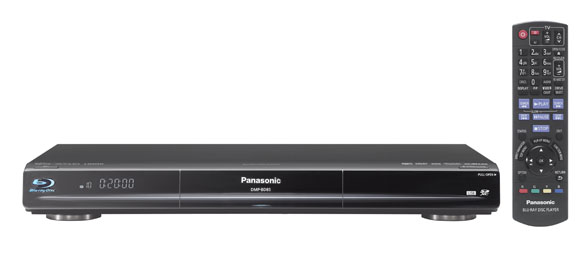
Panasonic continues to build on its already established Blu-ray product range. With improved picture and sound quality, you get the full Home Theatre experience in your living room.
Sophie Barton, Group Marketing Manager AV, Panasonic Australia
Details of the new features are as follows:
Increased Networking Capabilities
The DMP-BD85 and DMP-BD65 offer advanced networking capabilities and Wireless LAN functionality, and the DMP-BD85 offers integrated DLNA capability to ensure seamless integration into the user’s home network, so recorded content can be watched in different rooms. VIERA CAST is incorporated in the DMP-BD85 and DMP-BD65, enabling users to access and view a wide variety of content, such as YouTube videos, Picasa photo albums, stock information on Bloomberg and weather forecasts. BD-Live compatibility on these two models allows users to connect to the Internet to download images, subtitles and other data, and take part in interactive activities and multi-player games linked to bonus cinema content found on Blu-ray discs.
Enhanced Picture Quality and Sound
All the models also boast PHL Reference Chroma Processor Plus for cinema-like picture quality. Developed at the Panasonic Hollywood Laboratory, this processing technology reproduces clear, vibrant colours that are extremely faithful to the original film. In addition, the DMP-BD85 also incorporates Adaptive Chroma Upsampling, which enhances colour reproduction in even the finest details. For incredible sound, the DMP-BD85 and DMP-BD65 feature a high-definition Audio Decoder (Dolby TrueHD, and DTS-HD Master Audio Essential) to take advantage of the exceptionally high-quality 7.1-channel surround sound now incorporated in Blu-ray Discs. Additionally, the DMP-BD85 features the HDMI Jitter Purifier to deliver clear and robust bass and allows for smoother transmission, for the best possible reproduction of Blu-ray sound.
Ease Of Use
When the TV is on, the VIERA Link function lets you switch to Blu-ray Disc player mode using just the Panasonic VIERA TV remote control. Simply press the VIERA Link button on the TV’s remote control and select “Player” on the VIERA Link Menu screen. The Blu-ray DiscTM Player’s menu will display on the TV screen, and you can begin playback of a Blu-Ray Disc or select from the Blu-Ray Disc menu.
Portability
Panasonic will also additionally offer two portable Blu-ray players, the DMP-B500 and DMP-B100, so users can enjoy High Definition content wherever they go. The DMP-B500 features a 25.7cm (10.1-inch) LCD screen so users can comfortably enjoy Blu-Ray movies or view still images on the go, as well as DLNA capability and a wireless LAN adaptor. The DMP-B100 incorporates a 22.6cm (8.9-inch) LCD screen and comes standard with a car bracket and car DC adaptor which simplifies power supply on long car trips.
Blu Ray Disc Recorders
Panasonic has also released a range of Blu Ray Disc recorders which are leading the way in Blu-Ray technology, the Panasonic DMR-BW880 and DMR-BW780 feature twin HD tuners, DLNA Home Networking and easy to use connectivity features such as VIERA CAST.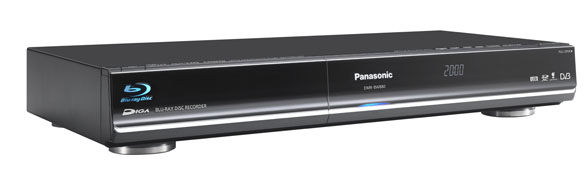
“Panasonic continues to lead the way in Blu-Ray innovation, bringing two advanced Blu-ray Recorders to the Australian market. With extended features such as DLNA Home Networking and easy to use connectivity features such as VIERA CAST, we are taking home entertainment into the next generation.”
Sophie Barton, Group Marketing Manager, AV, Panasonic Australia
Key features of both models of the players include:
Convenient Networking and Connectivity
The DMR-BW880 and DMR-BW780 are equipped with the new DLNA server functionality for amazing convenience and versatility. Using your LAN connection, recorded programs, AVCHD video and JPEG files archived on the HDD can be viewed and enjoyed in a separate room via a compatible DLNA client device.The twin HD tuners allow users to record two digital broadcasts simultaneously, even while watching a Blu-ray movie. With a 500GB HDD, the DMR-BW880 offers incredible storage space, offering a maximum of 350 hours recording capacity in HM mode, and The DMR-BW880 and DMR-BW780 offer 500GB and 250GB HDD recording respectively.
Enhanced Picture and Sound Quality
Thanks to PHL Reference Chroma Processor Plus – a combination of Panasonic Hollywood Laboratory (PHL) software encoding technology and Panasonic’s decoding technology – users will enjoy the highest quality images with colours that are exceptionally faithful to the original. Users can also access the internet in their loungeroom with Panasonic’s VIERA Cast. YouTube, Web-based photos on Picasa, stock information on Bloomberg and weather forecasts are currently available, while BD-Live also allows Blu-ray Disc bonus content to be downloaded and Internet games to be played.
Ease of Use
Consumers will find these new models even easier to use, with an improved graphical user interface (GUI) allowing functions to be accessed from the top menu. There is also a 60 second skip forward and 10 second skip back button for faster, simpler navigation, while VIERA Link also allows easy operation of connected Panasonic AV components with a single remote control. In addition, the latest 7-day EPG functionality allows TV programs to be archived and displayed by genre – such as Sport or Drama. They offer a number of convenient recording and archiving features. As well as recording content on the high-capacity HDD, they allow recording to dual-layer Blu-ray Disc, and offer an SD Memory Card slot so stunning Full-HD images can be saved from an SD Card onto the HDD or a Blu-Ray Disc. DivX playback means users can play their downloaded movie and TV content via the Recorder’s USB port or DVD disc.
Model Release Dates and Pricing
Blue Ray Disc Players
DMP – BD85 April – $499
DMP – BD65 April – $299
DMP – BD45 April – $269
DMP – B500 June – $999
DMP – B100 June – $699
Blue Ray Disc Recorders
DMR – BW880 April – $1,499
DMR – BW780 April – $1,299
This Panasanic DMP-BD65 blu-ray player has a good quality image. I like it !
got a DMP-BD65 an live in australia but it keeps telling me it won’t play dvds cause not right region an got no idea what to do
I have just received my new DMP-BD65. The picture is great but I was very disappointed that it wouldn’t play my Region 2 (UK) DVDs. I thought all new DVD players were now ‘region free’.
Earlier blogs on the DMP-BD60 talk about that model being ‘multi-region’ and the quote from Team Panasonic was: “All Panasonic models are enhanced for region free playback”. So why not the BD65?
From memory, I think the firmware version out of the box is 1.23.
Hi Matt,
The region enhancement process is not related to firmware. Your unit should be region free already, if it is not please visit one of authorised service centres to have it enhanced, For details please visit http://www.panasonic.com.au/support/service_centres/
Thankyou,
Team Panasonic
Hi Gareth,
Your unit should be region free already, if it is not please visit one of authorised service centres to have it enhanced, For details please visit http://www.panasonic.com.au/support/service_centres/
Thankyou,
Team Panasonic
I have a DMR-BW850 and am very happy with it, but when I try to record two shows at once, it will not let me complete the process unless one of the shows is recorded at “DR” quality. I am unable to record 2 shows at “XP” or “SP” or “HG” or any other combination. I have not found this to be documented anywhere. Is this recording procedure there for a reason?
Hi,
I’ve just bought a latest Panasonic 3D TV, and tried to emulate 2D digital TV channel to 3D but not success. Please advice if there is a way to do it? I know Samsung has offer that function.
Many thanks.
Regards
Phil
I was wonderin what is the largest USB external HDD that can be attached? Also does the DLNA permit stuff to be copied to/from a PC?
Are these players actually region free to play blu ray dvd’s from anywhere in the world/ region A, B & C? I am interested in either Model DMR-BW780 or DMR-BW880, but only if it plays any regions’ blu rays Thanks.
Hi Lorraine,
These units only support region B or ALL Region BD Discs.
Many Thanks,
Team Panasonic
Hi Matthew,
Without knowing the model I am unable to answer your questions, however DLNA doesn’t permit the transfer of footage to or from a Panasonic recorder and a PC. The DLNA function is designed for media streaming only.
Many Thanks,
Team Panasonic
Hi Glynn,
Yes you need to have one recording set to DR mode in order to record two programmes simultaneously. This is documented on page 31 of the user manual.
Many Thanks,
Team Panasonic
Hi Phil,
The VT series does not offer this function.
Many Thanks,
Team Panasonic
Thanks for the response. I just purchased the DMR-BW880. The manual says it only supports supports up to 180GB external powered (FAT32) HDD, is that correct or has a firmware update fixed this? Also it is not DVD region free, how can I solve that issue?
Does the panasonic SA-BT230 stream video files from a linksys NAS200.
The player sees the files on the linksys NAS200 but doesn\’t play them, what can i do to get them working?
I use to have a Samsung Blue Ray and got very little or no noise when viewing.
I bought the Panasonic DMR BW780 connected it via HDMI cable to the TV but get a lot of noise specially on night scenes.
How can I fix this, I’ve tried everything I know.
I went to buy a DMR-BW880 yesterday, but the salesperson at Harvey Norman could not guarantee that the machine is fully region free in regards to ordinary dvd’s. I understand that ir is not for blu-ray, and can live with that, but I have a number of dvd’s from England and the US (regions 1 & 2) which I would want to play… Can you advise, please.
Hi
I would like to know if the Panasonic bd45 is a region free machine before I go and buy one,
Please advice.
Panasionic told me to take mine to the nearest “Authorised Service Centre” and they will fix the
DVD region code for no charge, as long as it is under warranty.
Panasionic told me to take mine to the nearest \"Authorised Service Centre\" and they will fix the
DVD region code for no charge, as long as it is under warranty.
Panasionic told me to take mine to the nearest \\"Authorised Service Centre\\" and they will fix the
DVD region code for no charge, as long as it is under warranty.
Hi Rino,
Yes if you record to a DVD and finalise the disc it is compatible with any DVD Player.
Many Thanks,
Team Panasonic
Hi John,
This does not sound normal but it is possible that darker scenes will show some noise depending on the way in which it was filmed. To confirm your unit is up to date please visit http://panasonic.jp/support/global/cs/bd/download/bw880/au.html and download the latest firmware.
Many Thanks,
Team Panasonic
Hi Erik,
If the player see’s the files but they are greyed out then it does not support the file type. It will depend on the file type and also the settings of the DLNA software on the PC.
Many Thanks,
Team Panasonic
Hi Matthew,
The DMR-BW880 only support USB memories up to 128GB that are formatted in FAT16 or FAT32 file format. Page 9 out of the user manual outlines the limitations of the USB port.
Many Thanks,
Team Panasonic
I just got a DMP BD65 Blu ray player…Why won\’t it play DVD\’s..? Í\’ve tried a few different regions but it makes no difference. It is unable to read any type of DVD..?? Help
can i set up the dmrbw 780 recorder to record foxtel
I am looking at the Blu Ray recorder models (780 or 880) – but note they only play DVD with region 4 or ALL. I have a number of DVDs I have purchased which are region 2 only. Will they play ? I note some Comments above asking about region setups and people having to take their units back to a Panasonic service centre to have them updated – I don’t want to have to do this – expect it to work “out of the box”
thanks
Hi Paul,
It sounds like you have a faulty product. You should return it to the place of purchase if it is under 21days old.
Many thanks,
Team Panasonic
Hi Neon,
You will need a composite AV cable (Yellow/Red/White) cable however it will depend on your FOXTEL box. Most FOXTEL boxes will output via a SCART connector so you will need to purchase a SCART to COMPOSITE AV cable or adaptor. You can then plug this into the FOXTEL box and into the AV1 Input on the rear of the DMR-XW380. To record FOXTEL you then use the [INPUT SELECT] button the recorder remote and select AV1, then select the FOXTEL channel using the FOXTEL remote and press record on the recorder remote. To timer record a FOXTEL channel, press the [PROG/CHECK] button to view the timer record screen, on the channel selection press the red button several times until AV1 input is selected, then select the date and time the FOXTEL programme is running. You will need to use the FOXTEL “planner” section to load the FOXTEL programme into the FOXTEL box.
Many Thanks,
Team Panasonic
Hi Malcolm,
Yes the DMR-BW780 and DMR-BW880 are enhanced to play these discs.
Many Thanks,
Team Panasonic
I have just purchased a DMR BW 850, and I am fairly tech savvy but I am confused with the Blu Ray saying in some places discs recorded on BW850 will play on other machines and then somewhere else it says they wont, what is the case. My question is simply is what do I have to record on what type of Blu Ray disc and I guess DR mode to play on my other brand blu ray player in the bedroom.
Do I have to finalise the blu ray like I need to do with my Sony DVD recorder, very early model no digital tuner, or what.
And is it normal for the screen to go blank for a few seconds when you change functions ?
HELP ! I need to know if the Panasonic Blu-Ray Player DMP-BD 45 is region free
Considering buying a DMRBW780. Important question, though. Is it possible to start viewing a program from the start while it is still recording?
Will these Panasonic Bluray recorderded Bluray disc’s playback on a Sony Playstation 3?
Hi Troy,
Panasonic records to BD discs in the BD-AV format. It would depend on the format supported by the PS3 as to whether or not the disc will play.
Many Thanks,
Team Panasonic
Hi Dale,
Yes it is. It is called chasing playback and you can fast forward and rewind within the content you have already recorded also. This can also be done whilst recording two programmes at the same time.
Many Thanks,
Team Panasonic
Hi Laura,
Hi, yes the DMP-BD45 should already be enhanced for region free playback. If you find it is not you can have the unit enhanced at any authorised service centre. For details please visit http://www.panasonic.com.au/support/service_centres/ .
Many Thanks,
Team Panasonic
Hi Tim,
Quite simply playback of a BD disc recorded in a Panasonic BD recorder on another BD Player will depend on what formats the BD player supports. Panasonic records to a BD disc in the BD-AV format, this format does not require finalisation for compatible playback if the player supports this format.
Many Thanks,
Team Panasonic
I purchased a DMR-BW780 yesterday. It would not tune most stations and would not display any station without the image breaking up and producing no sound. Returned it to the retailer who replaced it with another which he was able to tune with his “highly amplified signal”. He could not successfully tune the unit I returned.
The replacement unit, whilst retaining tune of all stations, will not display any station without breaking up and will produce no sound.
For over four years I have successfully run a Panasonic TU-SZT105A STB using the same antenna, wall outlet and RF fly lead.
What is going on?
Hey
I have just got a panasonic dmr xw380. It likewise says it is region 4 only but wondering if it will work on other regions?
Cheer
Hi, I just bought a Blu-ray disc home theater sound system (SC-BTT755) and I have connected to the home network and can view pictures but not any divx videos on my pc. They appear but ‘cannot play’ shows on the screen. Does this mean that divx files are not supported? Is there any update I need to download because I havn’t checked that out yet?
Kind regards
Terry
Am I correct that using these models to play standard DVD’s there is no region restriction?
I can play a standard movie DVD from any country?
Will these recorders still record to standard DVDs?
How much HD TV can I record on to a single Blueray Disc? For DVD’s it is generally two hours without loss of quality. Is it the same for BlueRay?
Thanks.
Just wondering if the unit DMR-BW880 plays region one discs from canada/us.
Thanks
Hi Philip,
I am sorry to hear you have any problems with your product. It is actually possible you have too much signal which causes over modulation. If this is the case you may need to attenuate the signal into the recorder. Call our Customer Care Centre and request an attenuator and they will send one out to you to try.
Many Thanks,
Team Panasonic
Hi Mel,
Yes your unit is enhanced for other region playback.
Many Thanks,
Team Panasonic
Hi Terry,
The DLNA function depends highly on the PC that your files are stored on. If the PC uses Windows7 you should have no problem streaming DivX files from the PC. If you are using other DLNA software on a PC other than Windows7 it will depend on the software file support.
Many Thanks,
Team Panasonic
Hi Roy,
You have not listed a model number so we are unable to answer the question, however most Panasonic DVD units are enhanced for region free playback of DVD’s.
Many Thanks,
Team Panasonic
Hi Cristina,
Yes the BW880 will play other region DVD’s.
Many Thanks,
Team Panasonic
Hi Just wondering if the DMP-BD45 Blu Ray player is region free or not and does this include both DVD’s and Blu Ray Discs?
Thank you
My brother and I just bought the BD-45 model each on the recommendation of a friend and I have to say I am so happy with the quality and features it has and would like to thank Panasonic for putting out such a great product with such easy to understand operation. What I would like to know is though, is this model region free for blu rays? A Simple yes or no would be greatly appreciated as I would like to know before I order something in from another country.
Many tahnks again, Tony.
Hi,
I’ve recently purchased a Panasonic 3D TV and Blu-ray home theatre system (SC-BTT755) and am having a bit of a problem playing DVD’s. Blu-ray movie (Avatar 3D) plays fine in both 2D and 3D but any DVD movie that I play shuts the player down after about 30 – 40 minutes. If I then turn the player back on and start again (or manually find my place again) it then lasts anywhere between another 5 – 40 minutes before it shuts itself off again. As you can imagine this is pretty annoying.
Is this an issue with the player or the way that I have it configured? The only config that I have set on the player are the defaults with the easy setup.
The connection is going via HDMI to the TV.
No error codes shown on the display of the player when/as it shuts off.
What am I doing wrong?
Thanks.
Hi, Anthony,
This is definitely not normal operation. Please contact one of our authorised service centres to have your unit inspected. For details visit http://www.panasonic.com.au/Support/Customer+support/Service+centre+locator
Many Thanks,
Team Panasonic
Hi Tony,
Panasonic does not enhance for region free BD playback, only region free DVD playback.
Many Thanks,
Team Panasonic
Hi Jackie,
This is definitely not normal operation. Please contact one of our authorised service centres to have your unit inspected. For details visit http://www.panasonic.com.au/Support/Customer+support/Service+centre+locator
Many Thanks,
Team Panasonic
Hi Ed,
The DMP-BD45 is enhanced for region free playback of DVD’s only.
Many Thanks,
Team Panasonic
I have a Panasonic BLU-RAY home theatre SC-BT230GN-K. I have had a problems with it freezing the picture in the middle of watching a DVD or Blu-Ray. Doesnt matter what you try you cant fast forward or rewind through that part of the movie. Occasionaly instead of freezing,it spikes our Plasma with a loud pop sound and we lose the picture altogther. The unit is also really slow to read a DVD, sometimes having several attempts. A Panasonic repairer has already done the “up grade” but it didnt fix the problem. This problem cant seem to be duplicated in the shop, but happens all the time at my place.
Any suggestions?
Hi, I have a dmr-bw780 bluray recorder. It will not tune to any sbs stations, even though they are ok when viewed through the tv. I have been sent an attenuator by panasonic but this has made no difference. The instructions with the attenuator say to check signal strength and quality, and that for the attenuator to work, strength can be anything, but quality must be 0. In my case quality is not 0. The instruction sheet says to contact the unit supplier if that is so. Any suggestions?
I was just about to buy a DMP-BD45 today but noticed the box said DVd Region 4. But this seems to be at odds with the multi region discussions above. Is it likely to be just old packaging or has Panasonic reverted back to single zone coding since the above discussion? Or is it likely I’ll just need to take it to my nearest service outlet for them to sort it out?
Thanks
Hi, I have jsut recently bought the SC-BTT755 3D blu ray player. Is this device region free?? im looking at buying some region 1 dvd’s and wanted to be sure they would work before buying? there has been mention of panasonic DVD players now all being region free but i cant find anything on the internet.
Regards
Sarah
Have just bought a Panasonic blue ray player DMP-BD45 from Harvey Norman, this player does not play PAL, all australian discs are PAL, what is a solution to fixing this problem? dont understand why it is being sold in Australia when its not compatible.
I desperately need some help please! Every Panasonic product I’ve owned is brilliant – but my new DMR-BW880 won’t tune into Channel 10 properly. It displays the picture as if it is set to the ‘Zoom’ function on the 16:9 picture. It is as if Channel 10 has been set to the ‘Zoom’ function to fill the entire screen. As a result, the quality of the resolution is reduced and there is lots of action going on in the furthest left/right of screen that I can’t see. Also, titles are half cut off on the left/right of screen.
The unit is connected with Component cables to my 4:3 TV, and HDMI to a 16:9 HD LCD projector but regardless the issue occurs on all displays.
The unit I am replacing, (the XW350) uses all the same equipment (i.e. displays on the same TV, tunes with the same aerial etc) and it has no problem showing Channel 10 in proper 16:9.
I’ve done the following to try to remedy:
1. Changed every aspect setting on the unit. These work great on every other channel (7,9,Eleven,Go,Gem,7TWO,7Mate etc etc all can adjust their aspect), but Channel 10 refuses to shift off Zoom.
2. Re-tuned the unit over a dozen times.
3. Changed arials.
4. Called Panasonic Support – their response, quote ‘I’m just can’t really help you – maybe try calling Channel 10’. I asked: ‘Who should I ask for at Channel 10?’, Response: ‘I don’t know’
5. Called Channel 10 – have left many messages with their Transmissions Faults hotline but they haven’t responded.
6. Have been into my local Good Guys today and they were good enough to hook up one of their Panasonic display stock to test. Sure enough, Channel 10 would not tune in 16:9 (only widescreen zoomed in and shaped 4:3). So I know it’s not just my unit that is affected.
7. Tried updating the software/firmware but the unit has the most up to date version.
8. Have contacted the retailer (Panasales Online) but am still awaiting a reply (not likely to get one as they refuse to assist with support).
Hi Brad,
This is very unusual and is definitely not normal for the picture to be the incorrect aspect ratio. However as all other channels are working it must be advised that it is more than likely a broadcaster issue. Whilst other models are working correctly, the hardware is different to the previous years and may react differentlu to changes in broadcaster transport streams depending on the product. If you feel the product has a fault, please contact one of our authorised service centres to have the unit inspected. For details please the official site here
Hi Jane,
The DMP-BD45 if purchased in Australia is a PAL Region 4 DVD/Region B Blu-Ray product.
Many Thanks,
Team Panasonic
Hi Sarah,
The SC-BTT755 is enhanced for region free DVD playback.
Many Thanks,
Team Panasonic
Hi Peter,
Yes the packaging states region 4 however your unit is already locally enhanced for region free DVD playback.
Many Thanks,
Team Panasonic
Hi Bruce,
If you have a booster on your aerial system it is more than likely you have over modulation on VHF services, if this is the case often we see this causes your signal quality to reduce to 0 however signal strength will be at 10. If this is not the case then it is more than likely you do not have over modulation but poor signal quality to begin with, if this is the case an attenuator will only reduce the signal even more. You may need to have your antenna checked for optimum digital reception. Alternately you can take your product to the place of purchase or one of our authorised service centres to confirm operation. For details please click here http://www.panasonic.! com.au/Support/Customer+support/Service+centre+locator
Many Thanks,
Team Panasonic
Hi Craig,
We are sorry you are experiencing a problem. We are unable to diagnose your problem. We can only suggest you return the product to the service centre to have the unit inspected again.
Many Thanks,
Team Panasonic
I have a Panasonic lcd tv model TX-32LZD800A.
I want to purchase a Panasonic Blu-ray Player capable of playing Divx and which supports mkv format.
Will I need an HDMI cable
Hi Jim,
No the HDMI cable is not required.
Many Thanks,
Team Panasonic
I have just bought a DMR-BW880, I want to set up the timer for daily recording of ABC News and other progs. It looks as though you can only set it up weekly on my unit. When I scroll up on the timer button it shows the next days and dates as you would expect. When I scroll down it shows “Fri 09.07, Fri 08.07, Thurs 07.07, Wed 06.07, Tues 05.07”, not what I expected and it doesn’t correlate with dates in July (07). It looks as though you have to set all daily recordings manually for every day. Doesn’t sound right to me. Also should I connect online to get software update. Thanks.
Hi, I have a DMP BW750 – is this multi region for DVD?
Thanks
I would just like somone to comfirm something for me,I have a Panosonic dmp-bd45, and before i go buying a bunch of blu rays from the U.S,will the region 1 blurays discs play on my player??
please anwser ASAP 🙂
I have the DMR-BW780 model and am v pleased with its performance but my query is… when I setup (ie Timer)to record from 2 channels simultaneously and am viewing a third, at the point of the commencment of recording, the third channel I was viewing is cut off and I am switched to 1 of the channels being recorded. I cannot switch back to my previous 3rd channel or to any other channel except one or other of the channels currently being recorded. Have I missed some important setup point here? Hope you can assist Reg
Purchased a dmr-bw-780 machine, which has been playing all types of dvd’s – however, now it says those same discs are “incompatible”…
what could have caused this change & ho do I fix it?
Hi Martin, it sounds like you could have a problem with your unit. Please visit one of our authorised service centres to have your unit inspected. For details please visit http://bit.ly/ea2nzl
All the Best, Team Panasonic
Hi Reg, the DMR-BW780 is equipped with a Twin HD Tuner, this means that it has only two tuners. By utilising both tuners for recordings you will only be able to watch one of the channels being recorded. To watch a third channel you will need to utilise the tuner in your TV and select the channel on your TV directly and not through the BD Recorder. I hope this helps. All the Best, Team Panasonic
Dear Panasonic Team,
Thank you for your prompt reply to my recent query. I can understand now and I will use this method in future.
Thanks again,
Reg Brine.
Hi Andrew, yes the DMR-BW750 should be enhanced for multi-region DVD playback. Cheers, Team Panasonic
Hi Chris, to set a timer recording for a particular program press the [GUIDE] button and highlight the show you wish to record. Press the [OK] button and this will load all the details of the program in to the timer record screen. If you are happy with the details loaded press the [OK] button again and the timer recording wil! l be loaded. If you wish to change any of the details of the recording, highlight the field e.g. date and alter it using the up/down buttons. To record the same program every day highlight the day/date field and press the [GREEN] button to change it to a weekly setting. Then use the up/down buttons to select MON-FRI etc. All the Best, Team Panasonic
Just purchased a DMR-PWT500GL.
I can play .avi files from the USB port fine.
It can see the exact same files on my computer via DLNA (iMac, OSX, TVMOBiLi) which I can select, but I get error “Cannot Play” when I try to do so. What video file types/codecs/name extensions are supported over DLNA?
Thanks,
Matt.
Hi Matt, there are a number of factors that allow the DMR-PWT500GL to play a file via DLNA. The PWT500GL needs to natively support the file as you have advised that USB playback is possible. The PC also needs to be able to play these files natively, in this case a CODEC pack is often required for your PC to allow playback of the files. DLNA uses an MPEG Transport stream to carry the file from the server device (PC) to the client device (PWT500). If you are using DLNA server software for operating systems other than Windows7, the software will also need an output profile to suit the client device. I hope this helps. Cheers, Team Panasonic
Ive got a 6 month old sa-bt230 1000watt bluray home theatre with the worst bluray picture ive ever seen. I have a 200hz lcd tv and the firmware is 1.10. Ive never really used it apart for as a sound system as my ps3 has a much better picture with dvd and bluray and is automatically updated via bluray discs. As i use mobile internet and it doesnt come with the wifi adaptor to update it, is there a disc that can update this easily like the ps3
Hi Shenan, Sorry to hear about your bad picture. Visit http://panasonic.jp/support/global/cs/bd/download/bt230/index2_euro.html for details on how to update your unit. All the best, Team Panasonic
I just purchased a DMR BWT700GL Blue ray recorder and I can’t tune in my Austar analogue programs. Is there any way of viewing/tuning an analogue signal/program.
Hi Fasteddie, Thanks for getting in touch. Panasonic’s range of HD Recorders do not have an analogue tuner so they cannot tune in analogue programmes. All the best, Team Panasonic
I have a DMR-PWT500 and a dlna server with some avi files. when i try to play the avi using the dmr as a dlna client i get the error “cannot play”. the manual says it supports divx files, so why can it not play avi?
Hi MJ,
Whilst the DMR-PWT500 is a DLNA client device, file support is dependent on a number of factors and not just the file extension. These range from file resolution, video codec, audio codec, and even the servers capabilities. See the supported versions on pg102. If you can give us more details, please contact 132 600 to discuss.
Thanks, Team Panasonic
Hi
I don’t see any reference to file resolution in the manual, can you provide details please. I have also created multiple DivX files, MKV files, SD files and HD files as per the manual supported list. The only version that the unit will play is the SD – so that is MPEG2 with an AC3 audio stream. Are you able to supply a sample DivX file that the unit should be able to play?
thanks
I purchased a DMR-XW380 a few months ago and most of the time works perfectly. However, there is an intermittent issue where without warning the signal is lost or the picture becomes pixelated and looses sound. This can last up to several hours before the signal returns. It does not appear to be a problem with the cables as I have changed each one. Also if I bi-pass the recorder and plug the TV straight into the arial, the signal through the TV is normal. Please advise what I should try?
Hi DH,
I am sorry for the troubles you are having. We would advise you to contact 132 600 for your nearest authorized service center to have the unit inspected. For details please visit http://www.panasonic.com.au/support/service_centres/
All the best, team Panasonic
Hi,
Is the Panasonic DMR-XW380 able to stream Divx movies from other DLNA compatible hardware or is it only a case of the DMR-XW380 streaming to other DLNA devices?
I have a DLNA Network Storage Unit that I want to stream movies to the DMR-XW38, is this possible?
Thanks
Glen
Hi Glen,
Thanks for getting in touch, the DMR-XW380 is a DLNA certified Server Device only. It cannot operate as a DLNA client.
Cheers, Team Panasonic
Can you provide a list of dlna servers that the DMR-PWT500 has been tested against that work please.
Dear Panasonic team, I would like to buy a code free BLURAY/D.V.D.player to go with my PANASONIC TH-42PX600A plasma t.v. I have been considering the PANASONIC DMPBD75 can you please give me your opinion in regards to this. Many thanks. Roy Harvey.
Hi,
Can the DMR-BW880 combine recorded title?. When manually setting the timer record it will record and split a show that runs over the advertised time.
Thanks
Matt
Hi Matt,
If you set one timer recording less than 8hrs in total length, then this should not split regardless of the broadcast running overtime. It will remain as one title. If you access the EPG, and load a recording based off the EPG information by selecting the show, the recorder will record these times unless you extend them.
Thanks,
Team Panasonic
Hi Roy,
The Panasonic’s range of BD/DVD Players can be enhanced at an Authorised Service Centre. This enhancement is valid for region free DVD playback only.
Cheers,
Team Panasonic
Hi
I have the panasonic dmr bw780 dvd player and was wondering if it was region free.
Hi Christina,
Yes the DMR-BW780 is enhanced for region free playback of DVD content only.
Cheers,
Team Panasonic
hi i want to buy blue ray player which is region free and plays any blue ray disc’s and dvd’s from all round the world ,pls waiting for your suggestion.
regards,
Chiru.
Hi
I have the panasonic DMR-BW850 and has been playing bluray fine since i bought it. I recently bought a US region dvd and was advised by panasonic that my machine was multi region dvd so it would play it – so far so good.
However now my machine will no longer play AUS region bluray movies! The message “incompatible disc” comes up!
Why does my machine no longer recognise legitimate bluray discs?
Help!
Thanks
I have a Panasonic DMR-BS880 Blu Ray recorder.
I am about to buy a Panasonic DMP-BDT110 Blu Ray player.
if I record on the 880 on Verbatim BD-RE DL – 50 GB 2x discs, can these be played on the player simply by putting the disc into the machine – i.e. without finalizing!
Presumably when I have watched the contents, i can put back into the recorder and simply delete and re-record again?
Thanks
Hi Frank,
We are sorry you are experiencing a problem. We would recommend contacting our customer care and they can assess the problem properly and find you the best solution. http://www.panasonic.com.au/support/customer_care/index.cfm or call 132600.
Best of luck,
Team Panasonic
from above it appears that my DMP-BD45 should be region free for DVDs though not for Blue-Ray discs. Is this correct because mine one will play neither DVDs nor Blue-Ray discs
Hi Paul, yes you can simply copy the titles to a BD-RE DL disc and then play them back on the DMP-BDT110. Finalisation will not be a problem whether required or not, as you are using BD-RE discs (re-writable), you will be able to format the disc regardless after you have copied the titles across.
Thanks,
Team Panasonic
Hi Russell, the DMP-BD45 is not sold as enhanced for region free playback for DVD content only. It can be enhanced at one of our Authorised Service Centres. For details please visit http://www.panasonic.com.au/Support/Customer+support/Service+centre+locator
Thanks,
Team Panasonic
Hi Team Panasonic,
I’ve just purchased a bluray recorder (DMR-PWT500GL)It’s all connected but have found that it will not work via my crest branded HDMI cable. I definitely know the recorder works because it works via the composite cables. Do I need a specific HDMI cable for this unit?
thank you
Just an addition to my above post, I have a 42inch Panasonic plasma viera TV.
thanks
I have DMP-BD45 player and I am trying to connect it to my Panasonic TH-L42D25A TV using a HDMI cable. I keep getting U72 message on the player and I have tried to follow the steps in the Instruction book to resolve it but still having no luck. Please help.
Hi, I just bought a Blu-ray disc home theater sound system (SC-BTT350 Home Theatre) and I have connected to the home network and can view pictures but not any divx videos on my pc. They appear but ‘cannot play’ shows on the screen. Does this mean that divx files are not supported?
I have tried playing through Serviio Server, Windows 7, Windows Homeserver and it sees all the files but just “CANNOT PLAY” is all I get.
I can play some of the files through the TV direct (Panasonic 3D plasma) but that has a mind of its own and only plays what is want’s.
My Blue-Ray player in the bedroom plays just about everything and guess what that’s Panasonic too. Is the now consistency across your products.
I have software updated everything and getting very frustrated with such a sever inconsistency across all the product range. The oldest Item in this list is six months at the most.
Hi Roger,
Sorry you’re experiencing problems.
Please give us a call on 132600 and we can talk about your issue in more detail.
Thanks,
Team Panasonic
Hi Jerolina,
This is a problem with HDMI communication. This could be due to a faulty HDMI cable or one of the products you are connecting together. Try another HDMI cable to confirm operation.
Cheers,
Team Panasonic
Hi Leni,
You need a high speed HDMI cable (sometimes referred to as V1.3a or V1.4), this will allow 3D functionality. Other version HDMI cables should work to produce normal 2D function and everyday functionality. If your Crest branded HDMI cable does not work, perhaps try a different brand.
Thank you,
Team Panasonic
Hi,
I have a SABTT755 blu ray DVD home theatre system and was wondering if it plays multiregion DVDs? eg is it Region free? ie does it play DVDs from the USA/Canada, UK, as well as Region 4(Australia)?
Thank you
I’ve asked this elsewhere, but my DMR-PWD500GL fails to linkl wit Virgin WiFi model.
Not least what is gateway number — — — — Is it just the IP address?
Hi Tim, yes your unit is enhanced for region free DVD playback 🙂
Cheers,
Team Panasonic
Hello TAN,
Thank you for getting in touch. Please call Panasonic help desk on 132 600 for assistance.
Cheers,
Team Panasonic
Hi we bought the DMP BD45 blu ray dvd player sometime late last year (late nov/dec) or early this year. I can’t find my receipt to know exactly what date so am unable to confirm if it is still under 12 months warranty. I want to buy some Region 1 discs but obviously not if the machine won’t play them.I can see from above posts that you can get enhancement from Service centre (nut only if inside warranty period) but I want to know if mine is already enhanced. Is there a way to tell? Thanks.
Hi Ginny, the DMP-BD45 is not released as enhanced. The only way to get the unit enhanced is via an authorised service centre and you will need to provide your proof of purchase to have this done under warranty.
Cheers,
Team Panasonic
Hi, I would like to stream movies I watch that are streamed over the net from Quickflix, to my DMR-PWT500 blu ray Player, from my PC (windows 7 home premium). Can you suggest the best way to do this? ( I have set up the wireless connection between the two devices), thank-you.
Hi Peter,
Please give us a call on 132600, we would be happy to take you through the set up.
Cheers,
Team Panasonic
hi is DMR-BWT700GL blu ray reigon free? if not can it be?
Hi Mat,
no it will only play region B or region ALL Blu Rays. It cannot be enhanced for Blu Ray.
Cheers,
Team Panasonic
Hi,
Can I purchase the blu ray player SC-BTT755 unit on it’s own? (without the speakers).
I already have the speakers from my previous Panasonic home theatre set up, but would like to upgrade my unit to a blu ray player?
Thanks
Hi Stan,
No, unfortunately you cannot purchase Home Theatre main units separately.
Cheers,
Team Panasonic
Hi
I have a SA-BTT755 blue ray player which won’t play any DVD’s due to region issues, live semi remote area & taking to service centre may not be best option. Any assistance welcome
Hi Mark,
We offer support via our Customer Care Centre who can be contacted on 132 600. Please contact us and we can advise you of your options to unlock your blu-ray player.
Cheers,
Team Panasonic
Hi
I have purchased a Panasonic DMR-PWT500 BLURAY PLAYER/Recorder. I have connected a external usb hdd to it and all good except it would not copy from it’s hdd to the external nor does it allow me to delete files from external hdd. I had an LG recorder which had a fault of turning it self off but done everything I asked it to. Does this panasonic recorder able to do these functions. Many Thanks
Hi,
Late last year we purchased a Blu-ray Disc Recorder model DMR-BW880. I have read through all of the above posts so have a fair idea of what the answer will be – but want to be 100% sure anyway. So here goes…..
I understand the DVD side of this unit is region free but not the Blu-ray which only comes “off the shelf” as compatible w/ Region “B” Blu-rays.
Is it possible to pay for an upgrade to Region Free using a Panasonic Authorised Repairer?
After researching I have discovered that there are “aftermarket” devices available, so it obviously CAN be done.
My preference however, is to use only Authorised Repairers so can you advise if you have anyone that DOES a region unlock for Blu-ray?
If the answer is no, can you please advise if there may be an option for this in the future given that the technology is available????
I look forward to hearing from you.
Regards,
Janelle
Hi Janelle, please follow this link to find your nearest Panasonic service centre who will be able to assist you further: http://panasonic.com.au/Support/Customer+support/Service+centre+locator
Cheers,
Team Panasonic
Hi i recently bought a DMR-BWT800 and when i tune the stations i cant recieve any channel 7 or 10 channels all the rest are fine. Please help
Hi Adam, please contact our Customer Care Centre on 132 600 for further assistance. To determine the reason you’re unable to receive channels 7 and 10, we will need to gain more information from you.
Cheers,
Tem Panasonic
Hi Adam, I am sorry you are experiencing problems. This problem could be either a localised reception problem or a fault with the unit. To verify if it is reception related, are you able to advise if you have any other Digital TV devices in your home that are working with these channels?
Thanks,
Team Panasonic
Hi Chris, copying from the PWT500 HDD to an external HDD is not permitted. You can also not delete files from an external device, this may be an external HDD, an SD Card, or other USB device.
Cheers,
Team Panasonic
I have a DMP-BD75 and have several DVDs from overseas but cannot play them as either they are not region free. Is it possible to unlock this model? Can I do this by ringing the service centre and getting advice over the phone?
Hi Elizabeth, you can find your nearest service centre here: http://panasonic.com.au/Support/Customer+support/Service+centre+locator who will be able to assist you further.
Cheers,
Team Panasonic
I have DMR-BW880, cannot record and/or receive any SBS stations – As soon as the recorder is turned on a message appears on the TV screen stating “No signal and/or invalid channel”. However can record and/or receive SBS stations through another TV in another room through a different system.
Regards. Ken
Hi Ken, if other DVB products are receiving SBS, then it is possible there is a fault with your recorder. Please visit one of our authorised service centres to have your unit assessed. For details please visit http://www.panasonic.com.au/Support/Customer+support/Service+centre+locator or call 132 600.
Cheers,
Team Panasonic
Hi I currently own a DMP-BD45 and I wish to have it enhanced to region free but I have lost my proof of purchase. What else can I do to get it enhanced to region free?
I have a Blu ray recorder DMR-BWT700 and it is a great unit but, I keep losing TV signal. The message is “No Service” or “No Signal”. If I wiggle TV input plug, the signal sometimes comes back on, and if I power off the unit and restart, it usually comes back on for a while. If I plug the TV Coax direclty into the TV, I do not have too many problems (I get an occasional No signal, but it sorts itself out. I live in Rotorua New Zealand and signal strehgth ranges from 6 to 9 with similar quality numbers. TV1 is the worst for dropping off. The unit is connected:- aerial in and then out to TV and there is also an HDMI cable connected to the TV. I bought it new in July 2011. How can I stop it losing signal and should it be sent back under warranty? SOrry for such a long post 🙂
Hi Nicole, we advise you contact your nearest service centre to have your product made region free: http://panasonic.com.au/Support/Customer+support/Service+centre+locator
Cheers,
Team Panasonic
Hi Dave, thanks for your comment but I believe your query will be best answered by Panasonic NZ – they can be contacted here: http://news.panasonic.co.nz/contact-us/
Cheers,
Team Panasonic
Will it cost me anything to have it enhanced region free if I have lost my proof of purchase?
I have just recently purchased a Panasonic DMR-PWT 500 and am trying to connect it to my annalogue satalite dish but casn’t find a signal. We will be receiving digital signals in the next year and am wondering if it will work then or is there anyway the annalogue signal will work?
Regards,
Geoff Bent
Hi Geoff, the DMR-PWT500 does not have an analogue tuner. It only has a twin digital tuner and can only pick up free to air DVB-T services.
Cheers,
Team Panasonic
I have a Panasonic blu ray home theatre system scbt737 and a wifi adapter wxyl10 or something like that. I am trying to stream files from my mybooklive home network, it recognizes the hd and I can see the files but it says ‘cannot play’ when I click on them…. I have tried avi, Mkv and mp4 files and nothing. Please help
Hi Hollie, the function you are referring to is called DLNA. This is the process of streaming files from a SERVER to a CLIENT. If the CLIENT does not support the file format, then the SERVER must “transcode” the file into a valid format the CLIENT can understand. Whilst the WD My Book Live is a DLNA Server, I understand it does not have the ability to “transcode”. This means the CLIENT must natively support all of the file formats via DLNA. In your case I suspect the files types are not supported by the BT737 via DLNA. Cheers, Team Panasonic.
Hi
I have just bought a DMR-BWT700 Blu Ray recorder and it won’t play Region 4 DVDs. Will I need to take this to a service centre for repairs?
Hi Jay,
In this case, you will need to bring it into a service centre to get that issue fixed.
I recently purchased a large screen Panasonic plasma and would like to also buy a Blu ray player. I have quite a few DVD’s from overseas so my question is, which of the Panasonic models support region free DVD’s as well as Blu ray?
I have a Blu Ray recorder DMR BW850 which I have had for 2 years now. Today it will not format a DVD disc when I placed it in the Blu Ray tray. It took me through the usual prompts which I responded to, however after a few seconds it came back with the message Format failed. I have tried 4 different discs in case I had a faulty disc, however got the same response each time. After multiple attempts to format the same disc, the machine then says that the disc is incompatible.
Dear Panasonic, I also am having problems playing video with my panasonic BTT350 via my network/NAS server, the error ‘Cannot play file’ persists, all video files show 00:00 duration??
I have 3 other clients on the same network all happily streaming the same video files (LG smart TV, WD live media player & ASUS oplay media player)
I have tried different DLNA server’s including Windows Media player in 7, XP & VISTA, as well as 2 different NAS servers (Netgear Stora & QNAP TS212)
All my other devices work 100% with these servers….why doesn’t the panasonic?
Can you tell me what disk format the panasonic will support via the network? And is there any limit on the size of the disk? as i suspect this might be the reason?
I have a Blu-ray Disc Player Model No DMP-BDT310 & can’t play discs on it from the UK. Is it possible to make this player region free?
Some truly choice content on this internet site , saved to bookmarks .
Hi,
I would be interested to know if anyone else who purchased a Panasonic BTT350 or similar has managed to stream and play video successfully from any DLNA server other than windows7 media server?
Are all Panasonic blue ray/ DVD players region free/multi region??
Hi
If the dmr-bw780 is region free can it play all region blue rays, if not is this possible?
Hi Christina, unfortunately the DMR-BW780 isn’t region-free for Blu-ray, and it’s not possible for it to be either. Sorry! 🙁 Cheers.
I have a Panasonic DMR BWT700GL Blu-ray recorder which I got it 2 weeks ago to replace a 4 year old Sony DVD recorder. For the first 2 weeks it managed to have all the stations scanned using Auto-Scan during initial setup However for the last couple of days after I re-run the Auto Scan (to pick up a new station and also I notice “No Signal” popping up for a few seconds before it picks up the station) it has not pick up any stations. Now after several auto-scan, manual scan and Update Channel options, I got Channel 10 (and other Channel 10 digital stations)but not others. Also even with the channels it picks up, often I get “No Signal” for a few seconds. My HD TV and old PVR have no problems getting all the broadcast stations.
I wonder if the Panasonic digital tuner is too sensitive or maybe is faulty? The Blu-ray recorder is showing strong Signal Strength (10) but no Signal Quality.
Hi
Last year in June I purchase Blu-ray recorder DMR-BWT700. Since yesterday when I type any word on Youtube (Viera Cast) search it shows “ERROR Status 401” I can’t find it on Operating Instruction Manual’s Troubleshooting pages. Can you plaese explain what it means and how to fix it?
Regards
Harish
Auckland (new Zealand)
Hi Harish, as this is Panasonic Australia’s blog, it’d be best if you contacted Panasonic New Zealand for assistance. You can email them here: http://www.panasonic.co.nz/contact-us/contact-form/ or give them a call on 09 272 0100. Cheers.
Hi
Before writing on this blog; I did what you have advised ie filled up the contact form and also left message on the phone but no one returned with any reply
Regards
Harish
i own SC-BTT 775 & DMR-PWT500 can i purchase 3D Blu ray discs while in the usa and play them when i get back in OZ
Hi Tom, the BluRay section is region locked to region B. Unfortunately it cannot be unlocked. Cheers.
Is the Panasonic DMR-BWT720 or 820 region free for blu ray? Is it region free for all other DVDs?
Hey guys, I’m confused are all Panasonic Blue Ray Players (current models) region free? And if not can they all be enhanced as you state in some of your answers.
Cheers
Matt
Hi Paul, unfortunately the DMR-BWT720/820 is not region free for BluRay, and it cannot be modified to be so.
Hi Matt, from all 2012 models onwards, all DVD players are preset to Region 4; these players can be set to region free by taking them to a Panasonic Authorised Service Centre. The same applies to the BluRay player DVD section, however the BluRay player section cannot be set to region free. Cheers!
hi I just purchased a DMP-BD79GN-K Blu ray player, can this be converted to region free? if so do I need to call and book into a service centre or just walk in?
Hi Danielle, this will be covered during the 12 month warranty period. Please contact our customer service team on 132600 who will be able to assist you further.
Hi
My Panasonic DMR-BW850 has lost Channel 10′, Eleven & One HD. Tried re-tuning automatically and manually but still nothing. Also tried resetting it. Any ideas?
Hi Rachel, we would suggest contacting our call centre on 132600 and they will be able to walk you through some solutions over the phone. Thanks
Hi. Did a firmware update yesterday then re-tuned and the system is now ok so no need to contact you guys.
Hi, Just purchased a DMR-PWT530GL and am unable to play dvd’s from region 1. Can I organise the machine to be made region free through the customer service team on 132600?
Hi Rohan, yes this is correct, please contact our customer service team.
Hi Have a Panasonic DMR-BW850 which I replaced the Western Digital 500 GB Sata Drive with the same spec’s drive (Western Digital 500GB) , when I turn the Machine on to reformat the new drive , it comes up with a Hard Drive error and says Please disconnect the AC mains lead and reconnect it then press POWER to restart POWER and OPEN/CLOSE are now effective Unfortunatelly it disregards the disc in the unit and it cycles only through the same message.
Any Ideas ??
Regards
Hi Stargate, the requirement to change the hard drive will need to follow a process outlined in the service manual, the error you mention maybe a fault with the formatting of the hard drive or a fault with another part within the unit. Please contact our customer service team on 132600 and they will be able to provide you with the closest service centre to inspect your unit.
hi, just bought my parents a Panasonic DMP-BD75 Blue Ray Disc Player but can’t play certain dvds. Is there a multi region code that I can enter for it to work? I have another player and when I insert the same dvd it’s not a problem.
Kind Regards.
Hi John, please contact our customer service team on 132600 and they will assist you with this matter.
Hi there, I have a SA-BTT755 Blu-ray 3d machine. Just recently, it has stopped playing 3d blu-rays. Plays normal Blu-ray OK, but won’t load 3d ones. Just says this operation is not allowed, and Cannot read. Anyone know why this is happening & what I must do to fix it ? Thanks Damon
Hi Damon, please contact our Customer Service Team on 132600 and they will trouble shoot this with you over the phone.
Hi Damon, have you downloaded any updates recently on your player? We can suggest a restore to factory settings reset. And if that does not work, please contact our customer service team on 132600 and they will assist you over the phone.
I have the Panasonic DMP-BD45 and was wondering before I start buying American DVDs if it will even play them because of the region code restrictions? Thanks a lot
Hi Eliza, due to the age of your unit, this most likely was done prior to you purchasing the unit. If you find it does not work, you can have it unlocked by an Authorised Service Centre.
Hi just wondering if the Panasonic SA-BTT755 is region free??
Hi Donald, this will need to be performed by an Authorised Service Centre. Please contact our call centre on 132600 to make these arrangements.
for years I have had a panasonic DMR E85H
WONDERFULL MACHINE,I can record to hard drive from a disc or TV then I can edit the recording or (and this is the beauty of this machine)record onto a blank disc.Is there a High Definition machine which will do the same.
Hi Sonny, absolutely our High definition machines have this feature. We recommended the DMR-BWT835 or DMR-XW390.
Just to be sure the DMR-BWT835 WILL DO WHAT MY OLD PLAYER DOSE, EDIT, RECORD TO DISC, ETC,ALSO IS IT REGION FREE AND WHAT IS THE DIFERENCE BETWEEN BWT835 AND BWT835GL.
We have recently purchased a DMR-PWT635GL and find we can no longer play either our old DVDs or BluRay discs bought overseas. We used to be able to play these fine on our old machine but this new one is region specific. Is there any way we can make it so that we can view discs from all regions? All suggestions gratefully received. Thanks
Hi Peter, please contact us on 132600 and we will arrange for an ASC to make arrangements for you to have this rectified. This will only work for DVD’s however, you are unable to play other region BluRay discs.
What USB HDD IS SUITABLE FOR USE WITH PANASONIC BLURAY RECORDER DMR-BWT835GL
Hello to every one, the contents present at this site are truly amazing for people experience,
well, keep up the nice work fellows.
Does your site have a contact page? I’m having a tough time locating it
but, I’d like to shoot you an e-mail. I’ve got some ideas for your blog you might be interested in hearing.
Either way, great blog and I look forward to seeing it expand
over time.
Hi, Panasonic does have a contact page and we look forward to hearing from you:
https://au.panasonic.com.au/Support/Contact+Panasonic/Contact+us+with+feedback
MCB
Write more, thats all I have to say. Literally, it seems as though you relied on the video to make your point.
You clearly know what youre talking about, why throw away your intelligence on just posting videos to your blog when you could be giving us something enlightening to read?
Hi Big Idea Mastermind Latino, your post has left us a little confused. Could you please clarify your concerns as there is no video in this post…it is entirely text…and one photo…MCB
Hi
Upon reading your blog I am a little confused.
I currently have a BD home theatre system but was think of upgrading to your las test and better model
Will it play all region DVD’s and Blu Ray or will I need to have it modified?
I am in a regional country town, so this would be difficulty
Thanks
Geoff
Hi Geoff, your player can be enhanced to play all region DVDs and within the warranty period this is a free service. Unfortunately, Blu-Ray will be locked to the Australian region code and this is unable to be modified – but our region code means all material is available through the Australian or the European market. MCB
Hi Panasonic,
Have a DMR-BW880 and want to play mpeg4 movies recorded on my computer.
When I attempt to play a disc the unit says not compatible.
Is it possible to enhance my model to play these movies?
Thanks in advance .. RS
Hi Rod, unfortunately to play a Disc on the DMR-BW880 requires the disc to be formatted to the machine. Doing this will erase the information from your computer. Sorry to disappoint! MCB
I have a DMR-BW 750. Can this unit be upgraded to play MP4, as I cannot play some Divx and Mp4 movies that I have downloaded and try to play back via USB stick.
thanks
Hi Ekrem, Unfortunately MP4 playback is not possible. Pg 11 in your user manual has information regarding all playable file types. MCB