
Get even closer to the action with two new compact camcorders from Panasonic, featuring 78x Advanced Optical Zoom

Panasonic Australia are launching two new compact high zoom camcorders – the SDR-S50 SD Memory Card camcorder and SDR-H85 80-GB HDD/SD Card hybrid camcorder – designed for new camcorder users who are looking for exceptional image quality, ease of use and compactness in a feature-rich package.
Both models offer a powerful 78x Advanced Optical Zoom lens and wide-angle 33mm lens – ideal for landscapes – as well as Advanced Optical Image Stabiliser (O.I.S) with new Active Mode. Easy-to-use features include Panasonic’s renowned Intelligent Auto (iA) now with a new AF/AE Tracking function to lock on to a subject for beautifully crisp, clear recording.
The lightweight and robust design of the SDR-H85 and SDR-S50 offer trouble-free portability and their flexible recording formats provide added convenience for users who want to shoot, share and store video anytime, anywhere.
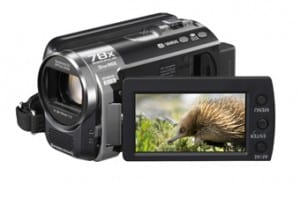 SDR-H85
The SDR-H85 is a hybrid camcorder which records large volumes of data onto an 80-GB hard disk drive or an SDXC, SDHC, or SD Memory Card, making it ideal for long events or when travelling on extended trips.
The built-in 80-GB HDD stores up to 74.5 hours (in LP mode) and when combined with a 64-GB SDXC Memory Card (optional), the camcorder provides an additional recording time of up to 60.5 hours (in LP mode). The SDR-H85 has exceptional reliability, made possible by the SDXC/SDHC/SD Memory Card (sold seperately) which requires no drive mechanism, combined with an Anti-Shock Shield that helps protect the built-in HDD from the effects of external impact. With its extended recording times and rugged design, this model is ideal for shooting lengthy events or for taking on the road.
It available in Black and set to be in stores in February 2010 at a RRP of $649.
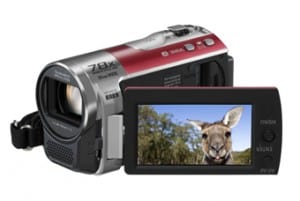 SDR-S50
The SDR-S50 is a Memory Card camcorder which records to SDXC, SDHC, or SD format cards, and has no drive mechanism allowing greater durability and compact size.
The SDR-S50 records onto SDXC/SDHC/SD Memory Cards (sold separately) so has fewer moving parts, making it highly resilient to external impact. With its small size and lightweight design, the SDR-S50 is ultra-portable for take-anywhere convenience to capture your memories anytime, anywhere. With VIERA Image Viewer, you can play back video recordings simply by inserting a SDHC/SD memory card into a Panasonic VIERA TV for dynamic, large screen viewing, without a PC or external playback device.
The SDR-S50, available in February 2010, will come in Red, Blue and Black. It has a RRP of $449.
Intelligent Auto with new AF/AE Tracking and Intelligent Contrast Control
The Intelligent Auto (iA) function, which automatically selects the most suitable shooting mode, has evolved even further.
It now includes an AF/AE Tracking feature that tracks a moving subject to ensure that it continues to be recorded in optimal focus and exposure settings, even if the subject moves or turns to one side. This keeps the AF/AE settings constantly optimised for sharp, clear images of a moving subject.
Alongside the new iA AF/AE Tracking, a new Intelligent Contrast Control feature that automatically adjusts brightness to maintain the best possible contrast, has also been added to the five advanced functions from previous models, including Face Detection, Advanced O.I.S., and Intelligent Scene Selector. Each is activated as required by simply pressing the iA button to capture beautiful images under virtually all shooting situations.
New Wind Noise Canceller feature
A new feature in 2010, Wind Noise Canceller automatically isolates and suppresses wind noise only, to help ensure natural ambient sounds and voices are still recorded.
I RECENTLY PURCHASED A PANASONIC SDR-S50 I AM NOT VERY PROFICIENT WITH MAYBE MY AGE BUT ANYWAY. MY WIFE DOWNLOADED THE SD CARD TO HER LAP TOP, WE WERE ON VACATION AND WHEN WE GOT HOME WE TRIED TO DOWNLOAD THE MEDIA DISK TO A DVD FOR MOVIES AND IT WOULD NOT ALLOW US TO DO IT. WE TOOK IT TO CVS PHARMACY PHOTO CENTER THEY COULD,NT DOD IT EITHER. HOW DO WE DO THIS, I WANT IT SO WE CAN WATCH IT ON T.V. THANKS
Hi Greg,
The SDR-S50 is supplied with editing software Video Cam suite 3.0, this will allow the video to be edited & recorded to a dvd.
Many Thanks,
Team Panasonic
I just recently purchased SDR-S50 Camera and 16GB Lexmar card and went to Europe for my sons wedding. Unfortunately on the last week the camera said to check disk and wouldnt work. I have just paid $450 to get it recovered as it was very important to us as we took his wedding photos. Anyway its been recovered but in MOD files. How do I get them to run and be edited by VideoCam Suite 3.0 As currently it will not recognise the files even if I rename the extension file to AVI or MPEG? It comes up as greyed out in the software in all extensions. How do I convert MOD file to work in your software so I can burn to DVD and play on TV to show my family.
Your help in this matter would be appreciated. Many thanks Craig
Hi I have just downloaded my first video using my new Panasonic SDR-H85 and wish to edit it using windows movie maker only to find that the file format is not compatible.
Can please tell me how I can change the format to one that windows movie maker will accept as I would like to be able to over dub my video with some music files.
Thanks
Richard
Hi Richard,
This might be a problem you will have to get in touch with Microsoft for. Please let us know how you get on.
Many Thanks,
Team Panasonic
Hi Craig,
Once the data on the card was recovered can the images/videos be played on the camera?
If the folder structure of the files on the card are not maintained the information won’t be able to be played in the camera or downloaded via Video Cam Suite 3.0 . Are you able to give us a bit more detail?
Many Thanks,
Team Panasonic
Hey can this camcorder record live tv onto it cause I want to record my games onto the camcorder and upload them to YouTube
Hi,
I just bought a Panasonic SRD-S45 to film my sons hockeygames. Since the camera did not come with the USB cable I tried to move the files (MOD-files) to my PC through a SD-card reader. However, when trying to access these files on the PC with the VideoCam Suite 3.0 – however VideoCam Suite does not find them.
Any clues?
Thanks
Pär
Solved the problem – just needed to format my SDHC-card.
Pär
Hi Zac,
No, the camera cannot record a line input signal.
Many Thanks,
Team Panasonic
hi I have shot a couple vidoes using my video camera SDR-T55 model ,at the time i did not have an SD card so I used the built in memory to save the videos . I would like to transfer my videos to the computer to edit them Is there a way to get videos off of the camera and onto the computer that are saved on the built in memory? or is there a way to transfer the videos on the built in memory to the SD card I now have?
Do I have to remove the SD card from my SDR-S50 when not in use? Where can I get the tripod?
Hi AnneMarie,
The application software provided with the camera will allow the customer to download & edit the footage. Please note this model is not imported into Australia.
Many Thanks,
Team Panasonic
Hi Nora,
No you can leave it in there.
Many Thanks,
Team Panasonic
Noel Green says:
Your comment is awaiting moderation.
December 19, 2010 at 1:41 pm
I recently (last week) bought a SDR-S50 camcorder, and tried it with a 4GB SDHC card I had.
I did not like the quality of the “long play” MP4s so I reverted to the standard MPEG2 recording.
I purchased a Kingston 32GB SDHC Class 10 card, and the camera informed me that I would have 15 hours of recording. Yesterday 18th December I attended the wedding of a relative, and recorded 44 minutes in 10 clips, starting from MOV001.MOD to MOV00A.MOD with thier associated .MOI files and a PRG001.PGI file. The camera then told me that “This card cannot record in video mode” and refused to take any more Videos. “The Videocam suite 3? finds the card in the camera,but will not read it. I copied all the files using a card reader, and it still would not recognise them on the computer. I then renamed the “.MOD” files to .MPG and used another software suite to merge them and write a DVD successfully. The camera is not asking to format the card but unless I delete everything on the card it will not record. This will not be suitable when I am away from my computer on a holiday.
As you can see, I submitted this query some 8 weeks ago, and have had no reply or other help from Panasonic. This site will not allow me to view the January archive, telling me I do not have access with the details I have provided, but I can not find anywhere but here to input details..
Hi Noel,
If the problems occurs with both the 4GB card & 32GB card, It may be best to take the cards & camera to a service centre to confirm if there is a fault with the camera or card.
If you contact Customer Care on 132600 they can find out where the closest service centre is.
Many Thanks,
Team Panasonic
Just to follow-up my concern that i wrote here last middle of feb. i guess about the camera that i bought just last dec. that is very very poor quality on the video or still pics. I havent used it since then, just want to return it.
Hi Ernie,
To return the unit the you will have to go back to the retailer where you purchased the unit.
Many Thanks,
Team Panasonic
Richard: I was having a similar issue, and apparently it is solvable, and no, you don’t have to go to Microsoft! The Panasonic folks surely know that the native file on the Panasonic is a MOD file, and can be downloaded through a MOD conversion program, for which you can set the output to .avi, .mov, whatever Moviemaker needs. Look around out there, they are available. One example is Brorsoft’s MOD converter. But you have do download those files either directly off the camera (not through Panasonic’s editor, which converts to Mpeg2) or take the card out and do a direct extraction. Panasonic: why did you not mention this to Richard? Surely if anyone could have told him about conversions, you could! It’s not a Microsoft issue, it’s a common mode format issue!! Panasonic makes a great little camera, but I think a lot more folks would be happier if y’all were a little less proprietary in your responses to calls for help!
Hi Gary & Richard, Yes, there are third party software/programmes that can convert our HD AVCHD files from this to almost any files type you like, Panasonic however does not support, endorse or have any recommendations in particular as we supply our own application/editing software with our products in the box. In regarding the native file having an MOD extension, there is also the native AVCHD files have an extension of .MTS. All the best, Team Panasonic
Hi. I am using the SDR-S50P camcorder and a PNY 8GB memory card. Whenever I format the card and start a new recording, the screen says that I have a total of 3 hours and 33 minutes of recording time. I recorded something today and I now have 3 hours and 7 minutes left on the card. The problem is that when I switch to playback mode, the message “NO DATA” appears. Apparently I have 26 minutes of recorded material somewhere on my camcorder. Could you tell me how to access it?
Hi Chris,
This model is not imported into Australia. It would be best to try another card and if you are still getting the same result, I would suggest contacting Customer Care on 132600 to find you the closest service centre near you. They will be able to assess the problem properly.
All the best,
Team Panasonic
I have a Panasonic SDR-H85 80GB camcorder and have taken several videos on it. How do I transfer them to my computer? Also can you watch them on a TV?
Hi Joel,
The SDR-H85 is supplied with application software “VIDEO CAM SUITE 3.0” that allows data from the camera to be transferred to a pc & edited.
Thanks,
Team Panasonic
I have a panasonic SDR S50 and I’m having problems viewing my videos in sound but also now the camera says “This card cannot record in video mode” how do I fix his?
I recorded some scenes for school with a Panasonic SDR H85. I was unable to transfer the files from the HDD onto my laptop (both PC and MAC). I tried using the program that came with the camcorder, no luck. The files became a “read only” file.
Hi Steven, please call us at our Customer Care Centre on 132600, as we require more information in order to assist you.
Cheers,
Team Panasonic
I have the Panasonic SDR-T55. Is there anyway to record videos without the sound? Or can you use the VideoCam Suite 3.0 to put the movies on dvd and eliminate the audio?
Thanks, Vick
Hi Vick,
This model isn’t actually sold in Australia.
There really is no way to not record sound or mute it during the recording as the camera or software doesn’t have this type of functionality.
Maybe a more sophisticated video editing program can, but these are third party programs & you would need to do your research in this area before purchase.
Thanks,
Team Panasonic
Hi! I recieved a panasonic H85 (80gb hdd) for Christmas. The picture quality is very poor on both xp and sp mode. Is there an example of what the quality should be like?
Hi Catriona, the camera you were given for Christmas is standard definition camcorder and does not record in high definition. A steady hand with appropriate settings will help produce clear recordings, we recommend heading into your nearest store to compare it to the same camera and have a salesperson take you through the settings.
Cheers,
Team Panasonic
i have a panasonic sdr-h85 i downloaded to xp on my computer but it wont open and i get a note from suite 3.0 saying use a display environment of 1024*768, 16 bits or more.. whats that ??
Hi Roger, thanks for your comment and I hope you’re enjoying using your camcorder. “1024*768, 16 bits or more” refers to the recommended display resolution settings on your PC. You can access display setting from the Control panel (on your Windows PC) or in System Preferences if you’re using a Mac. If you require further assistance, please call our Customer Care Centre on 132 600.
Cheers,
Team Panasonic
Im not that much of a internet reader to be honest but your blogs really nice, keep it up!
I’ll go ahead and bookmark your website to come back in the future. All the best
Is it possible to purchase a operators manuel for my SDR-H85 Vidocam ?
Hi Peter, we have just emailed the user manual to you. Cheers!
my old computer died that had video suite 3 on it and we moved now i cant found the disk how do i get it the software
I have lots of videos on my Panasonic sdr-h85 that I want to put onto a disc, I have loaded the videocam suite 3 sofeware onto my new laptop that has windows 8 I have done everything instructed but I cant play the videos it comes up error but some of the videos that were recorded in longplay work? please help as the videos are from when my 4 year old was a baby and I don’t want to lose them any anyone with info can email me juliadoe@aol.com thankyou
Hi Julia, Video Cam suite 3.0 is compatible with Windows 8. Being recorded in LP mode shouldn’t be an issue. Could you please advise what error message is being displayed? Thanks.
I have a Panasonic SDR-H85 the included software ( VideoCam Suite 3.0) does not seem to work with my Mac and I can’t find any support on Panasonic’s website. Where can I get Mac compatible software?
Hi Neil,
Sorry, but Panasonic cameras don’t support or come with application software that is MAC compatible. For usage with a Mac PC please refer to page 97 of the Operating Instructions.
Thanks
I am trying to organise putting my recorded films onto my computer. I have the right software installed. i now am trying to select menu – 23. This is where I am stumped.
Hi John, it is difficult for us to help you with this query over social media and email. It might be best for you to call our Customer Care Centre for assistance. The number is 132 600. Thanks
My SDR-S50 no longer turns on. This just happened out of the blue.
I have tried 3 different batteries, (all charged externally), but even using the AC adapter, the camera will not power up.
When I attach a battery, the ‘access’ lamp and the tiny lamp above the mode switch both shine red for about 1 second, but the camera does not switch on as such.
Is there anything I can do to make the camera power up/work?
Thanks.
Hi Tim, the SDR-S50 will require repair, please contact CCC 132600 to find your closest repairer. Thanks
Hi,
I have just purchased your new HC-X920m Camcorder. I also purchased a SDHC 32GB UHS-1 class 10 memory card. It does not work in the camcorder. Please explain why it does not work, AND what 32GB memory cards will work.
Thank you
John
Hi John,
That is a high spec SD card which should work, please “format” the SD card using the Camcorder and go to:
“MENU”
“SETUP”
“FORMAT MEDIA”
“SD CARD”
NOTE: All data will be erased on the SD card.
If this does not work, please contact our call centre on 132600.
Thanks
I have the Panasonic SDR-H85 I’ve had it for at least 2yrs. Until a couple months ago I could no longer connect my usb from the camcorder to my computer and take my videos off, as I was thinking it was the usb it self that stopped working. Well, I purchased another usb and it still doesn’t work. I am at a loss as to what to do next. I use this camcorder to record my Pastor’s sermons for DVD’s and I need the videos ASAP! What to do?
Thanks in Advance.
Hi Angela, please contact our customer service team on 132600 who will take you thru some things over the phone to confirm if there is a fault with your product.
I have a SDR-H85, but the original software can’t be install in my new computer ( windows 8.1) How I can get this new software. Thanks in advance.
Hi Victor, all product compatibility can be viewed here http://panasonic.jp/support/global/cs/info/windows8.html
Please refer to *1 and *2 notes for your software.
I recently had to purchase a new laptop with Windows8…now when I connect my SDR-H85 I only get audio, no video. It says that my video is not supported. Why is that? I’m hoping you can help! I’ve tried everything I can think of!
Thanks!
Hi Christy, please refer to the following information in relation to compatibility with Windows 8: http://panasonic.jp/support/global/cs/info/windows8.html
Hi,
Would it be possible to email me a copy of the operators manual for my SDR-H85 Videocam?
Hi Bobbie, Operating Instructions manuals can be downloaded from our Support website by clicking on ‘Owner’s Manuals’. I’ve done a search for you in our Support website and this is the link for the SDR-H85 Operating Instructions pdf.
Hi. I recently created a video on my Panasonic SDR-H85 and stored it on the hard drive. When I went to upload the video on the computer via USB, the computer wouldn’t register the USB connection. So, I’m left with (in my mind) two options:
1. Figure out how to get the computer to register that a USB connection is attempted to be made.
2. Somehow transfer the video from the hard drive to an SD card.
I think option two is the most viable. Can someone help me figure out how to do this, or is it impossible?
Thank you!
Hi Augs, are you using Video Cam Suite 3.0 that was supplied with the camera to transfer the files across? The pc should see the camera when it is turned on & then connected to the usb port. If this isn’t happening, it may be an issue with the camera or pc. May be best to connect the camera to another pc & see if it connects? If it doesn’t, the camera has a fault, if it does the pc is faulty.
Hi There!
Ive purchased this Video recorder and it works great, however, whenever I record it saves the file in individual files like a camera would.
Is there a special setting that makes the camera save files like this that i can turn off. I want to record a video continuously like the old video recorders use to.
Any help would be great!
Hi Troy, please provide us with your model number and we can have someone contact you in relation to this matter. Thanks.
My Panasonic SDR-H85 recently decided to stop working in the middle of an overseas holiday.
When I flip the screen to turn on the two small red lights above the battery flash on for about a second, then go dark.
There is no other sign of life from the camera.
Is there a software reset process I need to follow or do I need to have a repairer look at it.
Thanks.
Hi John, please call our customer service team on 132600 and they will book a service call for your camera. One final point to check before you do this is to charge the battery for 12 hours and confirm it isn’t that the battery is fully charged.
thanks Simone.
Will call customer service